
Only 2 of 11 federal agencies earned a passing grade on password security guidance.
Introduction
The same federal agencies telling you to create stronger passwords are failing their own security recommendations.
Bitwarden just released their fourth annual State of Password Security report. They graded 11 federal agencies on how well they communicate password best practices to the public. The results? Embarrassing.
Only 2 agencies earned an "Excellent" rating. One agency, the Department of Homeland Security (yes, the department responsible for protecting the homeland), scored "Room for Improvement," the lowest possible grade.
I dug through the 25-page report so you don't have to. Here's what the feds are getting wrong, who's actually doing it right, and what this means for how you should be managing your own passwords.
The Good: CISA and the FTC are the only agencies providing "Excellent" guidance.
The Bad: 9 out of 11 agencies fail to meet modern password security communication standards.
The Ugly: DHS scored the lowest possible grade despite being the parent agency of top-scorer CISA.
The Verdict: Stop following federal advice blindly. Use a password manager and 15+ character passphrases.
Table of Contents
The Grading System: What Bitwarden Measured
Bitwarden didn't just make up arbitrary scores. They evaluated each agency on five specific criteria:
- Recommends use of a password manager (most agencies fail here)
- Calls out importance of strong passwords
- Cites need for 2FA/MFA
- Overall security advice is up-to-date and adheres to NIST guidelines
- Lays out recommendations in a clear, digestible, easy-to-find manner
The ratings scale:
- Excellent: Hits all five criteria
- Very Good: Hits four (usually missing the "easy to find" requirement)
- Good: Misses password manager recommendation, has outdated advice
- Fair: Outdated advice, inconsistent MFA recommendations
- Room for Improvement: Basically useless
Here's the thing that should bother you: NIST (National Institute of Standards and Technology) literally sets the standards other agencies are supposed to follow. The Office of Management and Budget mandates that all federal agencies implement NIST's cybersecurity guidance.
So how did NIST score? "Very Good," not "Excellent." Their own website is so disorganized that finding their password advice requires digging through dense PDFs.
The Full Report Card: All 11 Agencies Ranked
| Agency | Grade | Key Strength/Weakness |
|---|---|---|
| CISA | Excellent | Pro-active, easy-to-find advice; modern 16+ char focus |
| FTC | Excellent | Extremely user-friendly; references consumer reviews |
| NIST | Very Good | Gold standard info, but buried in dense PDFs |
| NSA | Very Good | Improved this year by adding password manager recommendation |
| Dept. of Commerce | Very Good | Solid advice, poor website organization |
| FBI | Good | Mentions strong passwords, but no password manager guidance |
| SBA | Good | Basic MFA coverage, lacks depth |
| White House | Good | Mentions strong passwords, dropped password manager rec from 2022 |
| FCC | Fair | Still recommends outdated 90-day password rotation |
| SEC | Fair | Dated 2020 guidance, requires digging to find |
| DHS | Room for Improvement | Zero actionable guidance; essentially a PR page |
The pattern is clear: agencies that recommend password managers and make their guidance easy to find score higher. Agencies that bury advice in PDFs or skip password guidance entirely fall behind.
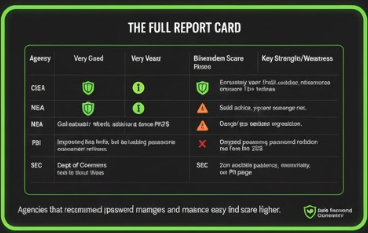
Agencies that recommend password managers and make guidance easy to find score higher.
The 2 Agencies That Actually Got It Right
CISA (Cybersecurity and Infrastructure Security Agency): Excellent
CISA improved from "Very Good" last year to "Excellent" in 2025. They did it by making their information easier to access and digest.
What CISA gets right:
- Explicitly recommends password managers (with a dedicated "PRO TIP" callout)
- Specifies passwords should be at least 16 characters
- Provides clear examples of strong passphrases ("HorsePurpleHatRunBay")
- Links directly to their guidance from the homepage
- Includes a YouTube video explaining the concepts
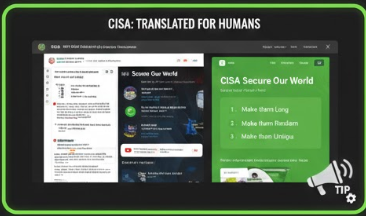
Their "Secure Our World" campaign breaks down password security into three simple tips: make passwords long, make them random, make them unique. That's it. No jargon, no 47-page PDF to download.
FTC (Federal Trade Commission): Excellent
The FTC's approach is refreshingly practical. They acknowledge that "studies show people aren't good at creating and remembering strong passwords." Instead of lecturing, they offer solutions.
What the FTC gets right:
- Recommends password managers by name as a category
- Suggests 15+ character passwords
- Explains how to use browser-generated passwords
- Links to third-party reviews (Consumer Reports) for choosing a password manager
- Reminds users to enable MFA on important accounts
The FTC also includes a password checklist that reads like something a normal human wrote, not a government committee.
The pattern: Both agencies that earned "Excellent" made their advice easy to find and actually recommend password managers. That's the bar. It's not high.
The 1 Agency That Completely Failed
Department of Homeland Security: Room for Improvement
DHS scored the lowest possible rating. Their cybersecurity page is essentially a press release about how important cybersecurity is, without any actual password guidance.
What DHS gets wrong:
- No password manager recommendation
- No mention of strong passwords
- No clear 2FA/MFA guidance
- No dedicated password security page
- Links to a fireside chat with the Girl Scouts CEO instead of actionable advice
The irony is painful. CISA, which earned the top score, operates under DHS. The parent agency responsible for national security can't be bothered to put together a basic password guide, while their sub-agency created one of the best resources available.
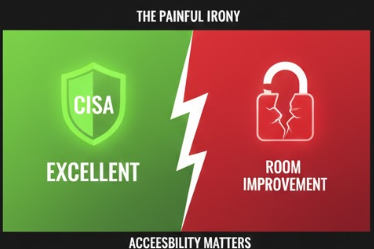
CISA operates under DHS. The sub-agency outperformed its parent by the widest possible margin.
DHS's cybersecurity page talks about "sprints" and "priorities" and "the unprecedented cybersecurity challenges currently facing the United States." What it doesn't do is tell you to use a password manager or create passwords longer than 8 characters.
If you work for a company that takes security cues from federal agencies, make sure they're following CISA's guidance, not DHS's.
Why NIST's Password Advice Is Buried in PDFs
DHS isn't the only agency with a communication problem. NIST, the organization that literally writes the rules everyone else follows, can't make their own guidance accessible.
NIST is supposed to be the gold standard. Their Digital Identity Guidelines are what every other agency claims to follow. The problem? Good luck finding them.
NIST scored "Very Good" because their actual advice is solid:
- Recommends password managers
- Says passwords should be minimum 8 characters, preferably 15+
- Explicitly states: do NOT require periodic password changes
- Do NOT impose complexity rules (mixing uppercase, numbers, symbols)
- Allow paste functionality so password managers work properly
That last point matters. NIST specifically says websites should let you paste passwords because it "facilitates the use of password managers, which are widely used and in many cases increase the likelihood that users will choose stronger memorized secrets."
So why didn't NIST get "Excellent"? Their website is a mess.
The password guidance lives in a 35,000-word PDF called SP 800-63B. To find the section on passwords, you need to navigate to the Risk Management Framework, then click through to IA-5(18), then read language clearly written for compliance officers, not regular people.
NIST buries guidance in dense PDFs. CISA puts the same advice on a clean webpage with three bullet points.
Compare that to CISA's approach: a single webpage with three bullet points and a video.
NIST creates the standards. CISA translates them into English. That's the dynamic, and it explains why so many agencies have outdated advice. They're technically "following NIST" by requiring complex passwords and 90-day rotation cycles, when NIST actually recommends against both of those practices.
5 Things Every Agency Should Recommend (But Most Don't)
So what separates the agencies that get it right from the ones still stuck in 2015? Five specific recommendations.
Based on the report, here's what the top performers do differently:
1. Use a Password Manager
Only 5 of 11 agencies recommend password managers. The others either ignore them entirely or bury the recommendation so deep nobody finds it.
The FBI's guidance? "Create a strong and unique passphrase for each online account." Great advice. How exactly should someone manage 100+ unique passphrases? They don't say.
2. Make Passwords Long (Not Complex)
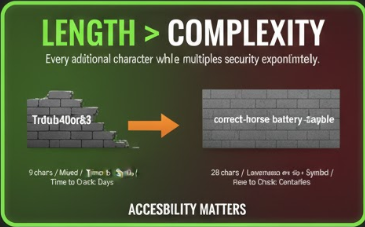
NIST killed the "P@ssw0rd!" approach years ago. Length beats complexity. A 16-character passphrase like "correct-horse-battery-staple" is stronger than "Tr0ub4dor&3" and actually memorable.
Why length wins: The math of password entropy
| Password | Length | Character Set | Time to Crack |
|---|---|---|---|
P@ssw0rd! |
9 chars | Mixed complexity | ~2 hours |
Tr0ub4dor&3 |
11 chars | Mixed complexity | ~3 days |
correcthorsebattery |
20 chars | Lowercase only | ~centuries |
correct-horse-battery-staple |
28 chars | Lowercase + symbol | ~heat death of universe |
Every additional character multiplies the possible combinations exponentially. A 16-character lowercase password has more entropy than an 8-character password with uppercase, numbers, and symbols. Length is the variable that matters most.
Every additional character multiplies security exponentially. A simple passphrase beats a complex short password.
The FCC still recommends changing passwords every three months. That directly contradicts NIST. Forced rotation leads to weaker passwords because people make predictable, incremental changes. "Summer2025!" becomes "Autumn2025!" becomes "Winter2025!" Attackers know this pattern. They've built tools specifically to exploit it.
3. Enable MFA Everywhere
Most agencies mention MFA, but few emphasize it correctly. The FTC specifically notes that authenticator apps and security keys are more secure than SMS codes.
The SBA mentions MFA exists. That's about it.
4. Stop Using Security Questions
NIST explicitly says: "Verifiers SHALL NOT prompt subscribers to use knowledge-based authentication (e.g., 'What was the name of your first pet?')."
Your mother's maiden name is on Ancestry.com. Your first pet's name is on your Facebook timeline from 2009. Security questions are security theater.
That's exactly why we built a security question generator. If a site forces you to use security questions, generate fake answers and store them in your password manager. Treat them like secondary passwords, not actual questions about your life.
5. Make the Guidance Findable
The SEC's password advice requires searching their site, clicking through to a 2020 PDF about credential stuffing, and reading between the lines. That's not guidance. That's a scavenger hunt.
CISA puts their password recommendations one click from the homepage. The White House doesn't have a dedicated cybersecurity page at all.
What This Means for Your Password Security
The federal government can't agree on password best practices. Some agencies follow NIST. Some follow advice from 2015. Some don't offer advice at all.
Here's what you should actually do, based on the agencies that got it right:
- Use a Password Manager
CISA, FTC, NIST, NSA, and the Department of Commerce all recommend them. If five federal agencies agree on something in cybersecurity, it's probably correct. - Make Passwords 15+ Characters
NIST says 8 minimum, 15 recommended. CISA says 16. A long passphrase beats a short complex password every time. - Stop Rotating Passwords on a Schedule
Only change them if there's evidence of compromise. The FCC's "every three months" advice is outdated and counterproductive. - Enable MFA on Everything Important
Email, banking, social media. Use an authenticator app or hardware key over SMS when possible. - Lie to Security Questions
If a site requires them, use fake answers generated randomly and store them in your password manager.
The Bitwarden report highlights something frustrating: the agencies responsible for our national security infrastructure can't coordinate on basic password hygiene. CISA and FTC figured it out. The other nine are playing catch-up, giving conflicting advice, or staying silent entirely.
Don't wait for the government to get its act together. Use a password manager, generate long random passwords, enable MFA, and move on with your life.
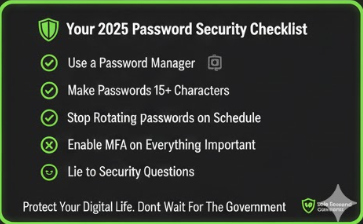
Protect your digital life. Don't wait for the government.
Final Takeaway
Bitwarden grades 11 agencies every year. Only 2 earned "Excellent" in 2025. The Department of Homeland Security got the worst score possible.
The agencies that succeed share two traits: they recommend password managers, and they make their guidance easy to find. That's it.
If you're looking for trustworthy government password advice, go to CISA's Secure Our World page or the FTC's password checklist. Skip the rest.
And yes, you should probably be using a password manager by now.
Frequently Asked Questions
What are NIST's current password guidelines for 2025?
NIST's SP 800-63B guidelines recommend passwords be a minimum of 8 characters, with 15+ characters preferred. NIST explicitly states organizations should NOT require periodic password changes, should NOT impose complexity rules (mixing uppercase, numbers, symbols), and should allow paste functionality to support password managers. Passwords should be checked against known breach databases.
Which federal agencies recommend using a password manager?
Five federal agencies explicitly recommend password managers: CISA, FTC, NIST, NSA, and the Department of Commerce. Six agencies (FBI, SBA, FCC, SEC, DHS, and the White House) do not include password manager recommendations in their public guidance.
How often should I change my password according to NIST?
NIST recommends you should NOT change passwords on a schedule. Only change passwords if there is evidence of compromise. Forced periodic rotation (like every 90 days) leads to weaker passwords because users make predictable incremental changes.
What is the minimum password length recommended by CISA?
CISA recommends passwords be at least 16 characters long. They emphasize that length is more important than complexity, and suggest using passphrases made of random unrelated words.
Why did DHS score so poorly on password security guidance?
DHS received the lowest possible rating ("Room for Improvement") because their cybersecurity page contains no password manager recommendations, no mention of strong passwords, no clear MFA guidance, and no dedicated password security resources. Ironically, CISA, which operates under DHS, scored "Excellent."
Is it safe to use a password manager?
Yes. CISA, FTC, NIST, NSA, and the Department of Commerce all recommend password managers. Password managers generate and store strong, unique passwords for each account, which is more secure than reusing passwords or writing them down. The main risk is if your master password is compromised, so use a strong passphrase and enable MFA on your password manager.