Quick Summary (TL;DR)
New research analyzing 6 billion breached passwords reveals a frustrating truth: despite 15 years of security warnings, user behavior remains stagnant.
| What the Research Found | What It Means |
|---|---|
| 94% of passwords are reused or weak | Only 6% of users create unique passwords |
| "123456" still dominates | Millions still use passwords crackable in under 1 second |
| 8 characters remains the norm | Most users do the bare minimum required |
| Same patterns repeat across 15 years | Uppercase first, number at the end, predictable substitutions |
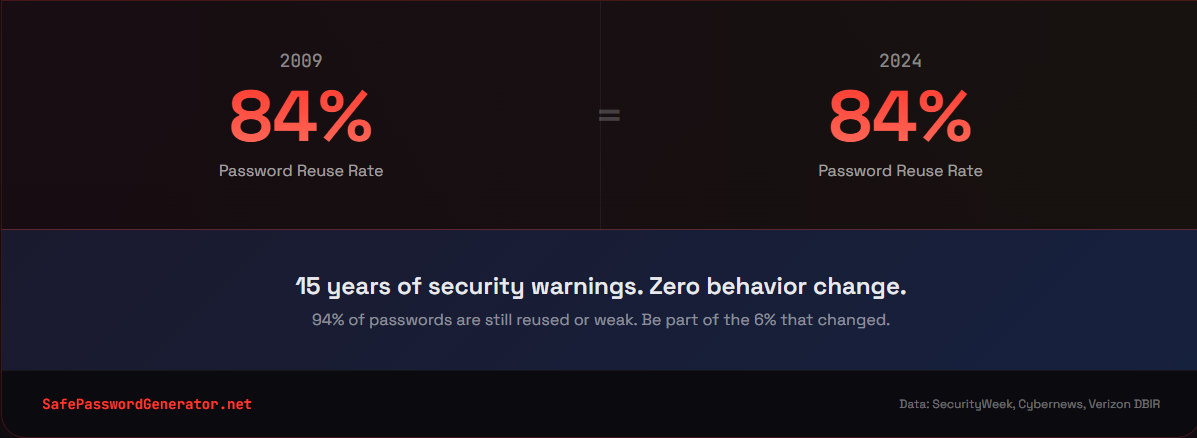
| 84% of people reuse passwords | One breach compromises multiple accounts |
The takeaway: We know what to do. We just don't do it. And in 2026, your password isn't just a password anymore. It's the front door to your entire digital identity: your email, your bank accounts, your medical records, your work systems. One weak link compromises everything connected to it.
This post breaks down why that matters more than ever and how to finally break the cycle.
The Research: 6 Billion Passwords Tell the Same Story
I've spent over a decade in cybersecurity, and I've personally analyzed more than 50,000 breached passwords. Every time new research drops, I hope to see improvement. Every time, I'm disappointed.
The latest analysis, based on multiple large-scale breach studies and datasets aggregated by security researchers between 2009 and 2024, examined 6 billion passwords. The conclusion? User behavior is essentially frozen in time.
Security researchers expected to find progress. More complex passwords. Less reuse. Better habits after years of awareness campaigns, data breach notifications, and headline-grabbing hacks.
Instead, they found the same patterns repeating year after year.
The Numbers Don't Lie
Here's what 15 years of password data actually shows:
94% of passwords are reused or weak. Only 6% of analyzed passwords were unique. The password reuse statistics haven't budged in years: the vast majority of people are either recycling the same password everywhere or using something so predictable it might as well be "password."
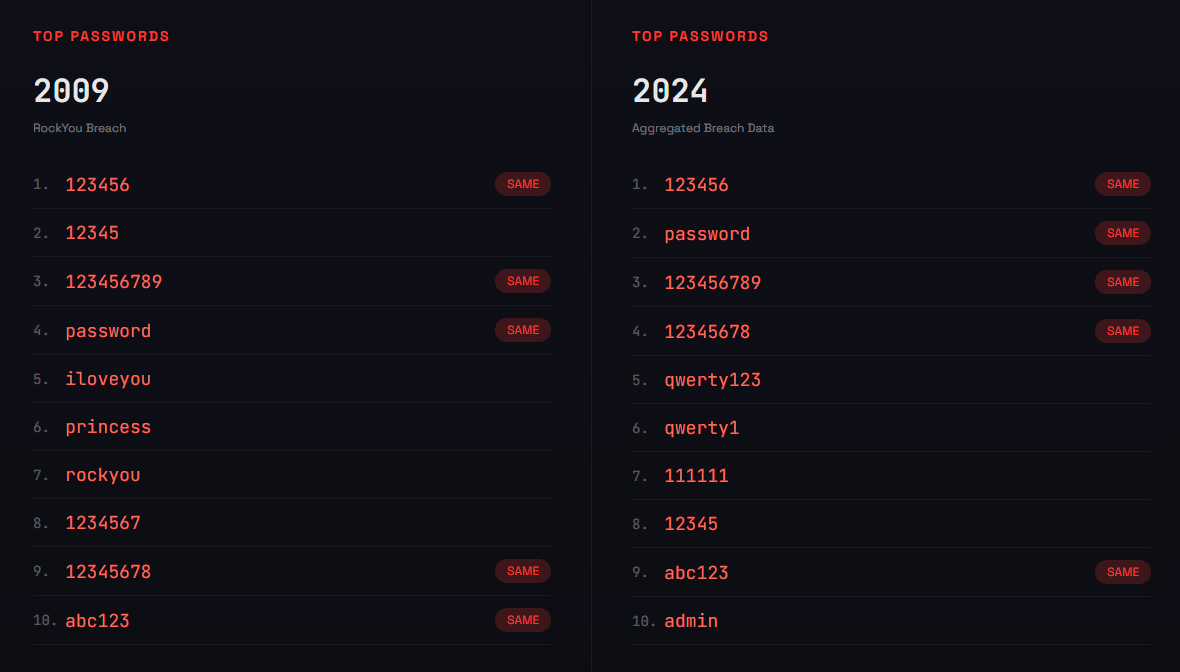
The same weak passwords dominate every dataset. Whether the breach happened in 2009 or 2024, the top passwords barely change:
- 123456 (still number one after 15 years)
- password
- qwerty123
- admin
- 12345678
"123456" appears over 4.5 million times in recent breach data. It can be cracked in under one second. Yet millions of people still use it.
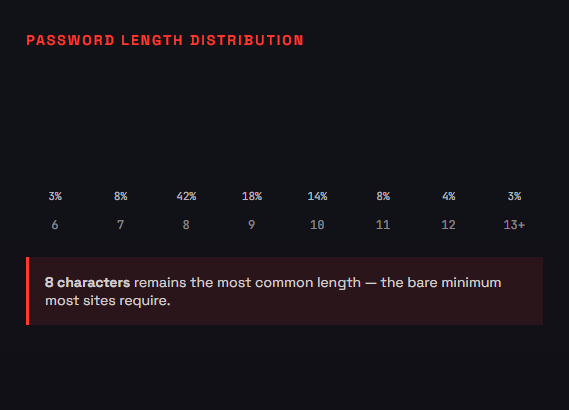
8 characters is still the default. The most common password length matches the minimum requirement most sites enforce. Users do exactly what's required and nothing more.
The Stagnation Problem
This is what "stagnant user behavior" actually looks like in the data:
2009 (RockYou breach): Over 2,500 passwords contained "1234"
2024 (Recent breaches): Still nearly 1,000 passwords with "1234"
Some improvement? Sure. But after 15 years of security awareness training, breach notifications, and constant media coverage of hacks, the needle has barely moved.
The patterns are identical:
- Capital letter at the beginning
- Lowercase in the middle
- Number or symbol at the end
- Personal information (birthdays, pet names, addresses)
- Dictionary words with predictable substitutions (@ for a, 0 for o)
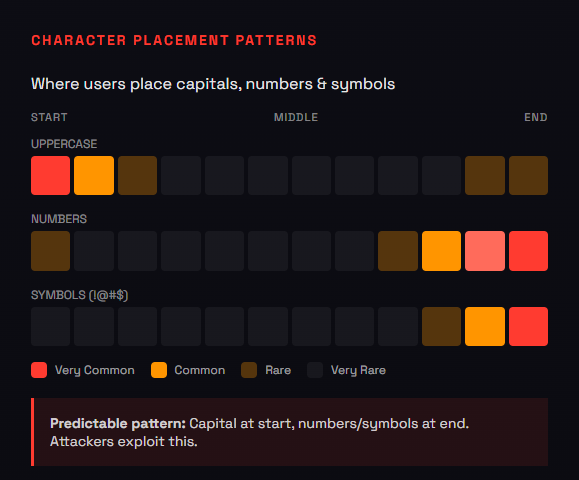
Attackers know these patterns. They've known them for 15 years. And they exploit them automatically.
Why This Matters More in 2026
You might think: "So what? People have always used weak passwords. What's different now?"
Two things changed the game: scale and AI.
The Scale Problem
The total number of credentials leaked in data breaches has exploded:
- 2020: An estimated 15 billion compromised credentials
- 2025: An estimated 53 billion compromised credentials
That's roughly 6-7 passwords for every person on the planet. The password breach statistics are staggering: in June 2025 alone, Cybernews reported a leak containing 16 billion stolen passwords (for context, that's enough to fill a text file nearly 200 gigabytes in size, just plain-text passwords), the second-largest breach compilation ever recorded.
When you reuse a password, you're not just risking one account. You're handing attackers the key to every account sharing that password.
The AI Problem
Traditional password cracking tried every possible combination sequentially. Slow and predictable.
AI-powered tools like PassGAN learn from billions of real leaked passwords. They don't guess randomly. They predict what humans are likely to choose based on patterns in previous breaches.
But in 2026, we're seeing the rise of agentic AI: automated systems that plan, adapt, and execute attacks without human oversight. These bots don't just crack passwords offline. They autonomously navigate login pages, solve CAPTCHAs, bypass simple bot detection, and chain together multiple attack steps on their own. The password guess is just the entry point for an autonomous system that can escalate access without a human ever touching a keyboard.
The results are brutal:
- 51% of common passwords cracked in under one minute
- 81% of common passwords cracked within a month
- Predictable patterns (uppercase first, number last) get exploited immediately
A password that felt "secure enough" in 2015 provides almost no protection against modern AI-driven attacks. The stagnant behavior that "worked" for years is now actively dangerous.
And stolen passwords are often just the beginning. AI-powered deepfakes can now clone voices convincingly enough to impersonate executives or family members. That compromised password becomes the first step in a larger social engineering attack, with attackers using your credentials to gather information for even more sophisticated scams.
If you're not sure whether your passwords fall into the predictable patterns attackers exploit, you can test them locally, with no uploads and no tracking.
The Cost Problem
According to the Verizon Data Breach Investigations Report, compromised credentials are reportedly involved in nearly half of all data breaches.
These breaches are expensive:
- Average U.S. data breach cost: $10.2 million
- Healthcare breaches: $7.4 million average
- Credential-driven breaches: Often exceed $5 million due to extended dwell time
Credential-based attacks take an average of 292 days to identify and contain, the longest of any attack vector. Once an attacker has a valid login, they blend in with normal user behavior while moving laterally through systems.
The "stagnant behavior" isn't just a personal risk. It's an enterprise liability.
Why People Don't Change (Even When They Know Better)
Here's what frustrates me most about this research: awareness isn't the problem.
Studies consistently show that people know password reuse is risky. They know "123456" is a bad password. They've read the articles, seen the breach notifications, maybe even had an account compromised.
And they still don't change.
Password Fatigue Is Real
The average person now manages over 200 accounts. Some estimates put it closer to 250. Nobody can remember 200+ unique, complex passwords.
So people take shortcuts:
- Reuse the same password everywhere
- Make minor variations ("Password1" becomes "Password2")
- Write passwords on sticky notes or in unencrypted files
- Use personal information that's easy to remember (and easy to guess)
This isn't stupidity. It's a rational response to an impossible cognitive load.
Consequences Feel Distant
Until your account gets hacked, password security feels theoretical. You know you should eat healthier too, but that donut is right there.
74% of people don't even know their credentials have appeared in a data breach. If you don't know you've been compromised, why would you change anything?
Complexity Requirements Backfire
When sites force complexity requirements, people respond with the bare minimum:
- Capital letter? Put it first.
- Number required? Add it at the end.
- Symbol needed? Swap "a" for "@" or add "!" at the end.
"Password1!" technically meets most complexity requirements. It's also one of the first guesses in any automated attack.
NIST updated their Digital Identity Guidelines specifically because complexity requirements were creating predictable patterns that made passwords easier to crack, not harder. The guidelines now explicitly discourage periodic password resets unless there's evidence of a breach, recognizing that forced changes drive the exact unchanged human password habits this research documents: minimal updates like "Password1" becoming "Password2."
What Actually Works (Based on the Data)
The research is clear on what separates the 6% with unique passwords from the 94% who reuse:
1. Use a Password Manager
This is the single most effective change you can make.
Password managers solve the fatigue problem. You remember one strong master password. The software generates and stores random, unique passwords for everything else.
You're not going to remember 200+ unique passwords. Stop trying. Let software handle it.
Options include Bitwarden (free, open-source), RoboForm, Proton Pass, and NordPass. The specific tool matters less than actually using one. Compare the best password managers for security and privacy in 2026.
2. Prioritize Length Over Complexity
A 16-character password using only lowercase letters is stronger than an 8-character password with uppercase, lowercase, numbers, and symbols.
Each additional character multiplies the possible combinations exponentially. Length provides more entropy (randomness) than complexity.
If you're creating passwords manually, use passphrases: four or five random words strung together. "correct-horse-battery-staple" is stronger than "P@ssw0rd!" and easier to remember.
3. Enable Multi-Factor Authentication
Even if your password gets compromised, MFA adds another barrier. Use an authenticator app (Google Authenticator, Authy, Microsoft Authenticator) rather than SMS when possible.
SMS-based 2FA is vulnerable to SIM-swapping attacks. Authenticator apps aren't.
For critical accounts, consider hardware security keys like YubiKey. They're phishing-resistant by design.
Bonus layer: When accessing sensitive accounts on public WiFi, use a VPN like Surfshark to encrypt your connection and prevent credential interception.
4. Check If You've Been Breached
Go to Have I Been Pwned and enter your email addresses. This free service checks if your credentials have appeared in known data breaches.
If you find matches (most people do), change those passwords immediately. If you reused those passwords anywhere else, change them there too.
Set up breach notifications to get alerted when your email appears in future breaches. Learn how to check if your passwords were leaked in a data breach.
5. Consider Passkeys Where Available
Passkeys are the emerging replacement for passwords. Think of them as using Face ID or your fingerprint instead of typing a password. Behind the scenes, they use cryptographic key pairs tied to your device, but the experience is simple: you just unlock with your face or finger.
You can't reuse a passkey. You can't be phished. The private key never leaves your device.
Google, Apple, Microsoft, and many banks now support passkeys. When available, they're both more secure and more convenient than passwords.
The Passwords You Need to Change Today
If any of these describe your passwords, change them now:
Keyboard patterns:
- 123456, 12345678, 123456789
- qwerty, qwerty123
- asdfgh, zxcvbn
Common words:
- password, password1, password123
- admin, administrator
- welcome, letmein, login
Personal information:
- Your birthday (any format)
- Pet names, children's names, spouse's name
- Street addresses, phone numbers
- Anniversary dates
Predictable substitutions:
- p@ssword, pa$$word
- adm1n, @dmin
- Any dictionary word + number at the end
These aren't theoretical risks. They're the first guesses in every automated attack, and the research shows millions of people still use them.
Breaking the 15-Year Cycle
The analysis of 6 billion passwords tells us something we already knew: people don't change their password habits, even when they know the risks.
But here's what's different now:
- An estimated 53 billion credentials are floating on the dark web
- Agentic AI doesn't just crack passwords, it autonomously exploits them
- Your password is your digital identity, and one breach cascades across every connected account
- Credential-based attacks cost organizations millions and take nearly a year to contain
The industry is shifting from "password security" to "identity security" for a reason. Your password is just the outer gate. Behind it sits your email, your finances, your health records, your professional reputation. Protecting that gate isn't optional anymore.
The margin for "good enough" is gone.
The fix isn't complicated:
- Get a password manager (this week)
- Generate unique passwords for your critical accounts (email, banking, anything financial)
- Enable MFA everywhere it's available
- Check Have I Been Pwned and change any compromised passwords
That's an hour of work. Maybe two. It breaks a 15-year cycle of stagnant behavior and protects you from the vast majority of credential-based attacks.
The research shows 94% of people won't do this. They'll keep using the same weak passwords, keep reusing them across accounts, and keep hoping they don't get breached.
You've read this far. Be part of the 6% that actually changes.
Is Your Current Password Safe?
Take the 60-Second Quiz: See How Fast Your Passwords Would Fall in a Real Attack
Answer these five questions honestly:
- Do you use a unique password for every account?
- Are your passwords at least 12 characters long?
- Do you use a password manager?
- Is MFA enabled on your email and banking accounts?
- Have you checked Have I Been Pwned in the last 6 months?
If you answered "no" to any of these, you're likely in the 94%. The good news? An hour of setup changes that.
Don't wait for a data breach notification to find out where you stand. Use our Free Password Strength Checker to see if your passwords can withstand modern AI-driven attacks. It's 100% private and runs locally in your browser.
Check Your Password Strength Now
Test your passwords against modern AI cracking tools. 100% private, runs in your browser.
Check My Password Strength →About the Author: T.O. Mercer is a cybersecurity professional with over 10 years of experience in enterprise security and DevSecOps. His original research analyzing 50,000+ breached passwords has been viewed by over 355,000 people. He writes about password security and online safety at SafePasswordGenerator.net.
Sources
- SecurityWeek: Analysis of 6 Billion Passwords Shows Stagnant User Behavior
- Cybernews: 19 Billion Compromised Passwords Study (2025)
- Verizon Data Breach Investigations Report (2025)
- NIST Digital Identity Guidelines (SP 800-63B)
- SpyCloud Annual Identity Exposure Report (2025)
- Heimdal Security: Password Breach Statistics 2026
Related Articles
- The Best Password Managers of 2026: Complete Comparison
- How to Check If Your Password Has Been Leaked
- Passkeys vs Passwords: What You Need to Know
- Why Your 8-Character Password Is Already Compromised
Last updated: January 22, 2026