If your company handbook still says "Passwords must be changed every 90 days and contain at least one uppercase letter, one symbol, and the blood of a unicorn," it is time for an update.
For decades, business password policies have been stuck in the dark ages. We forced employees to memorize complex gibberish, forced them to change it just as they finally memorized it, and then acted surprised when they wrote it on a sticky note under their keyboard.
The security landscape in 2026 looks different. The National Institute of Standards and Technology (NIST) and major security firms have finally admitted what users have known for years: Complex rules don't make us safer. They just make us tired.
Here is the no-nonsense guide to building a business password policy that actually works in 2026.
What does NIST require for business passwords in 2026?
NIST SP 800-63B Revision 4 requires a minimum of 15 characters for single-factor passwords, eliminates mandatory complexity rules (no forced symbols or uppercase), bans periodic resets unless compromise is detected, and requires screening against breached password databases. MFA is required for all business accounts with phishing-resistant methods (passkeys, hardware keys) preferred over SMS.
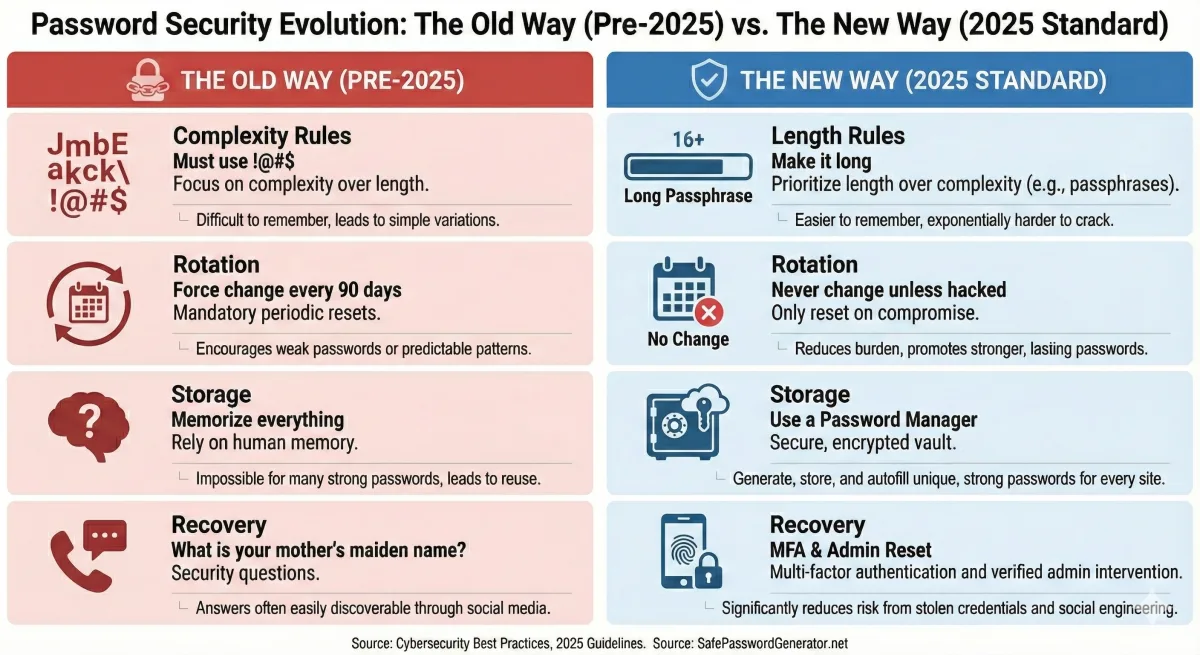
The Old Way vs. The New Way
Before we get into the rules, let's look at the philosophy shift.
This isn't just about making life easier for your team (though it does). It's about math. A 15-character password made of simple words is mathematically harder to crack than an 8-character password full of $ and & symbols.
Rule #1: Length Trumps Complexity
For years, IT departments demanded "complexity." The result? Users created passwords like Summer2024! and then updated them to Autumn2024! when forced to change. Hackers know this pattern. They have tools built specifically to guess it.
The New Policy:
- Minimum Length: 12 characters (15 is better).
- Complexity: None. No mandatory symbols. No mandatory numbers.
- Allow Spaces: Yes. Let users type sentences.
Why it works: A password like correct-horse-battery-staple (a famous example of high entropy) is easy to type and remember, but takes centuries for a computer to brute-force. A password like Tr0ub4dor&3 is hard to type, easy to forget, and can be cracked by a modern GPU rig in days.
Your Action Item: Drop the "special character" requirement. Set the minimum length to 12.
Rule #2: Kill the 90-Day Reset
This is the most controversial change for old-school IT managers, but it is critical. NIST guidelines now explicitly advise against periodic password resets.
When you force a user to change their password every 90 days, they don't create a new, strong random password. They take their old password and add a "1" to the end. Then a "2". Then a "3".
The New Policy:
- Expiration: Never.
- Exception: Force a reset only if there is evidence of a compromise (e.g., the user was phished or a database was breached).
Why it works: When users know they can keep a password forever, they are more willing to invest the mental energy to create one that is truly strong and unique.
Rule #3: The "Banned" List
If you remove complexity rules, what stops a user from choosing Password123?
This is where technology replaces policy. Instead of checking for "one uppercase letter," your system should check against a Blocklist.
The New Policy:
- Screening: Every new password must be checked against a database of known breached passwords (like the "Have I Been Pwned" database).
- Context Checks: Ban words related to your company. If you work at "Acme Corp," the word "Acme" should be banned from all passwords.
Why it works: It stops the actual bad passwords. P@ssword1 satisfies old complexity rules, but it is incredibly weak. A blocklist catches what complexity rules miss.
Rule #4: MFA is Non-Negotiable
In 2026, a password policy without Multi-Factor Authentication (MFA) is not a policy; it's a wish.
Passwords can be phished. They can be keylogged. They can be seen over a shoulder. MFA is the safety net that catches the attacker even if they have the right password.
The New Policy:
- Requirement: MFA on all business accounts. No exceptions for executives (they are the biggest targets).
- Type: Prefer "Phishing-Resistant" MFA (like YubiKeys or Passkeys) over SMS codes, which can be intercepted.
Rule #5: Stop the "Security Questions"
"What was the name of your first pet?" "What is your favorite sports team?"
These aren't security questions; they are public information. Thanks to social media, a hacker can find your mother's maiden name or your high school mascot in about 30 seconds.
The New Policy:
- Recovery: Eliminate security questions entirely.
- Replacement: Use automated email/SMS verification codes or IT-admin-assisted resets.
The "Human" Element: Provide the Tools
You cannot demand better security without providing the tools to achieve it.
1. Enterprise Password Managers
You shouldn't expect employees to memorize 50 different 15-character passwords. It's impossible. Provide a corporate subscription to a password manager (like 1Password, Bitwarden, or Proton Pass).
Policy: "You only need to memorize ONE strong Master Password. The software handles the rest."
2. The "Copy/Paste" Rule
Some old websites block users from pasting passwords into the login field. This is dangerous because it discourages using password managers (which rely on pasting long, complex strings).
Policy: Ensure your internal apps allow pasting.
Summary: The 2026 Checklist
Ready to update your handbook? Here is your cheat sheet:
- ✅ Increase Minimum Length: Set to 12+ characters.
- ❌ Remove Complexity Rules: No mandatory symbols or numbers.
- ❌ Stop Forced Resets: Only change if breached.
- ✅ Enable Blocklisting: Reject known leaked passwords.
- ✅ Enforce MFA: Everywhere.
- ✅ Provide a Password Manager: Make it easy to do the right thing.
Security shouldn't require a Computer Science degree. It should be simple, private, and effective. If you build a policy that respects your employees' time and intelligence, they will respect your security.