Reading time: 14 minutes | Last updated: January 4, 2026 | Category: Password Security
Passwordless Authentication in 2026: What It Actually Means for You
Quick Answer
Is passwordless authentication the future? Yes. The market hit $24 billion in 2025 and 70% of companies are adopting it. But here's what the headlines miss: 93% of users still type passwords every day. Only a few hundred sites support passkeys. You need BOTH passwords and passkeys for the next 5-10 years.
What to do now:
- Get a password manager that supports passkeys (NordPass, Proton Pass)
- Enable passkeys on Google, Apple, Microsoft, Amazon
- Keep strong unique passwords for everything else
TL;DR: The 60-Second Reality Check
Don't have 14 minutes? Here's the truth:
- The hype: "Passwords are dead!" Big Tech has been saying this for a decade.
- The reality: 93% of people still use passwords daily. Only 7% are fully passwordless.
- What changed: Passkeys actually work now. Google, Apple, Microsoft made them default.
- The problem: You have 100+ accounts. Maybe 20 support passkeys. The rest need passwords.
- The solution: A password manager that handles both. One tool, two technologies.
Jump to what matters:
Disclosure: Some links in this article are affiliate links. If you purchase through our links, we may earn a commission at no extra cost to you. We only recommend products we genuinely trust.
Big Tech wants to kill the password. They've been saying this for a decade.
But 2025-2026 feels different. Google made passkeys the default login. Microsoft followed. The passwordless market hit $24 billion. Governments are banning SMS authentication. Headlines everywhere declare: "The password is finally dead."
So we looked at the actual data. Here's what we found: 93% of users still type a password every day. Only 7% have gone fully passwordless. And most of your accounts don't even support the new technology yet.
The password isn't dead. It's dying slowly. And that slow death changes what you should do right now.
We run SafePasswordGenerator.net. We've analyzed over 50,000 breached passwords. We've watched the security landscape evolve for over a decade. Here's what's actually happening with passwordless authentication, what it means for you, and what you should do today.
What Is Passwordless Authentication?
Passwordless authentication is exactly what it sounds like: proving who you are without typing a password.
Instead of a password, you use one of these:
- Biometrics: Your fingerprint or face scan
- Passkeys: Cryptographic credentials stored on your device
- Hardware security keys: Physical USB or NFC devices like YubiKey
- Magic links: One-time links sent to your email
- Push notifications: Approve a login from your phone
The promise is compelling. No password means nothing to forget, nothing to guess, nothing to steal in a data breach. Phishing attacks become nearly impossible because there's no password to phish.
The technology actually works. It's been tested, standardized, and deployed by the biggest companies in the world. The question isn't whether passwordless is good. It's whether it's ready to replace passwords entirely.
Spoiler: it's not. Not yet.
The Numbers Behind the Headlines
Let's look at what's actually happening, not what marketing departments want you to believe.
📈 The Hype
- $24.1 billion market in 2025
- 70% of orgs planning passwordless
- 50% of US enterprises adopted
- 91.6% fewer security incidents
- 57.3% fewer help desk calls
📊 The Reality
- 93% still use passwords daily
- 7% are fully passwordless
- 14% use phishing-resistant auth
- 40% store at least one passkey
- ~300 sites support passkeys
The enterprise adoption numbers are real. Big companies with IT departments and security budgets are moving fast. But the average person? Still typing passwords every day.
The Timeline Reality
Even the companies pushing passwordless admit this will take years:
- UAE banks must eliminate SMS authentication by March 31, 2026
- India follows on April 1, 2026
- Philippines: June 2026
- EU Digital Identity Wallet rollout: end of 2026
Notice these are government deadlines forcing the change. And they're for SMS elimination, not full passwordless adoption. The natural transition will take much longer.
Our estimate: 5-10 years before passwordless is truly mainstream. You need a strategy for both worlds.
Passkeys are the future, but the transition will take years. In the meantime, millions of legacy systems still require traditional passwords. For accounts where you can't use a password manager and need to actually remember your credentials, a password generator designed for human memory can help you create something both secure and recallable.
How Passkeys Actually Work
Passkeys are the technology that might finally kill passwords. But most explanations make them sound more complicated than they are.
Here's the simple version.
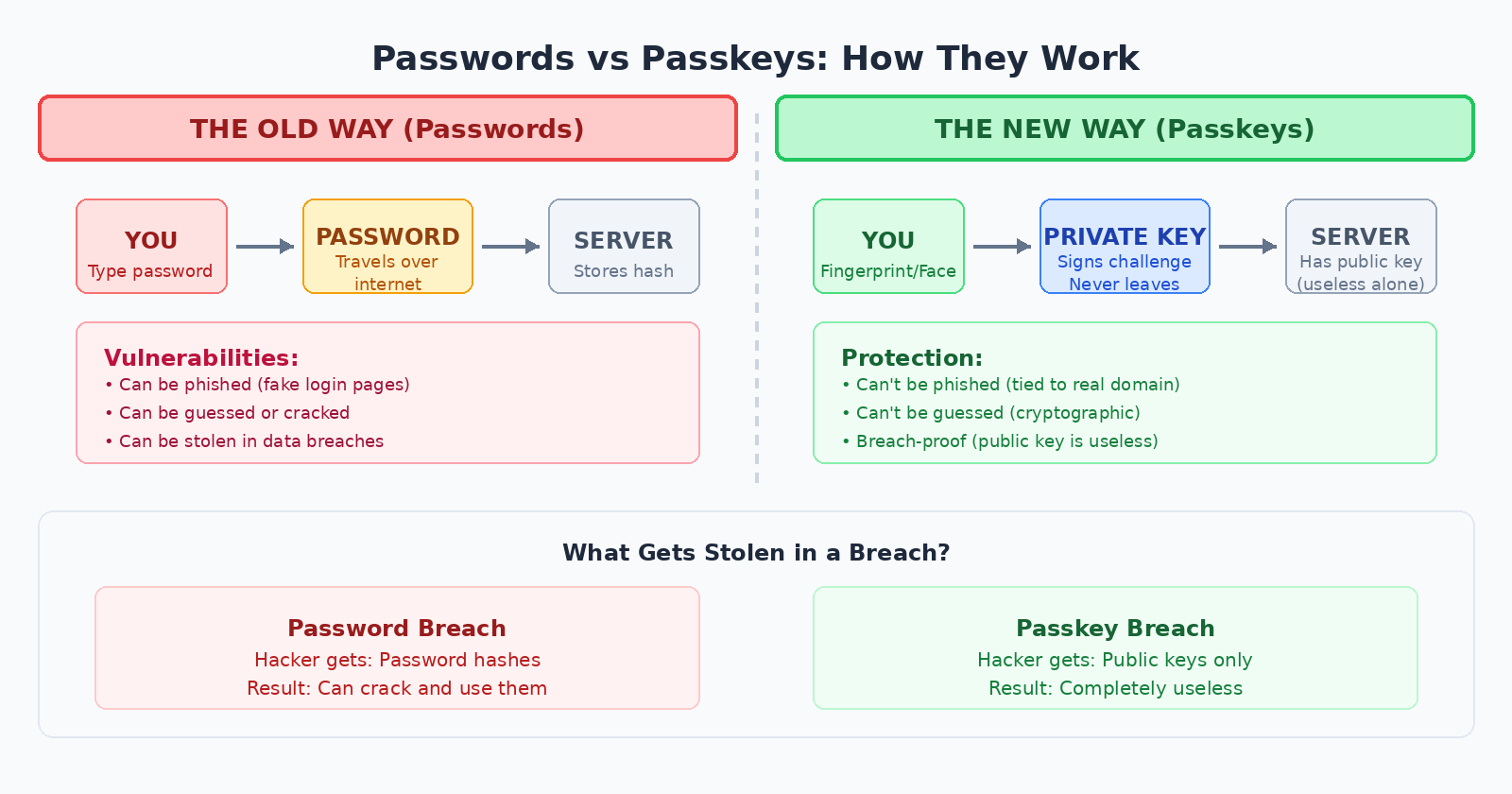
The Old Way (Passwords)
- You create a password: "MyD0g$name123"
- The website stores a hashed version
- When you log in, you type the password
- The password travels across the internet to the server
- Server checks if it matches
The problem: that password can be guessed, phished, leaked in a breach, or stolen from the website's database.
The New Way (Passkeys)
- You create a passkey on a website
- Your device generates two cryptographic keys: one public, one private
- The private key stays on your device, protected by your fingerprint or face
- The public key goes to the website
- When you log in, you authenticate locally (fingerprint/face)
- Your device uses the private key to sign a challenge from the server
- The server verifies the signature with the public key
The magic: your private key never leaves your device. There's nothing to intercept, nothing to phish, nothing to steal from a server breach. Even if hackers get the website's database, they only get public keys, which are useless without the private keys on your devices.
What Using a Passkey Feels Like
Forget the cryptography. Here's the user experience:
- Go to login page
- Click "Sign in with passkey"
- Touch your fingerprint sensor or glance at your phone for Face ID
- You're in
No typing. No remembering. Takes about 2 seconds. It's genuinely faster and easier than passwords.
Why Passkeys Are More Secure
Phishing-resistant: A fake website can't steal your passkey because the cryptographic challenge is tied to the real website's domain. Your passkey for google.com won't work on g00gle-login.com.
No reuse problem: Each passkey is unique to one site. There's no "password" to reuse across accounts.
Breach-proof: If the website gets hacked, attackers only get public keys. Without your private key (locked on your device), they're worthless.
Can't be guessed: There's no password to run through a cracking algorithm. The cryptography is essentially unbreakable.
For the technical details on password strength, see our password entropy guide. Passkeys sidestep the entire entropy problem by not using memorable strings at all.
Who's Actually Using Passkeys?
Adoption is real, but concentrated among major platforms.
The Big Three
Google: Made passkeys the default login for personal accounts in late 2023. Passkey authentications grew 352%. If you have a Google account, you can use a passkey right now.
Microsoft: Made passkeys the default for all new accounts in May 2025. Authentication growth jumped 120%. Windows Hello integrates passkeys into the operating system.
Apple: Launched passkeys in 2022 with iOS 16. Syncs passkeys via iCloud Keychain across all Apple devices.
Consumer Apps
Retail drives most passkey traffic. Amazon alone accounts for nearly 40% of all passkey authentications. Other supporters include:
- PayPal
- eBay
- Best Buy
- Target
- Home Depot
- Kayak
- Uber
Financial Services
Crypto exchange Gemini made passkeys mandatory in May 2025. Their authentications jumped 269%. PayPal, Robinhood, Coinbase, and Mercury support passkeys. Traditional banks are slower but moving.
The Long Tail Problem
Here's the catch: you don't have accounts at 20 companies. You have accounts at 100+ companies. And most of them don't support passkeys.
Your bank? Probably not.
Government portals? Definitely not.
That random e-commerce site you used once? No chance.
Your employer's legacy HR system? Dream on.
This is why you can't go passwordless yet. The infrastructure isn't there for most of your digital life.
The Big Tech Ecosystem Trap
There's something the passkey marketing materials don't emphasize: Apple, Google, and Microsoft all want to be your passkey provider.
When you create a passkey with your iPhone, it goes into iCloud Keychain. When you create one on Chrome, it goes into Google Password Manager. On Windows, it's Windows Hello.
This creates a problem.
Scenario: You Switch Phones
You've been using an iPhone. All your passkeys are in iCloud Keychain. Now you switch to Android.
Your passkeys don't come with you.
You'd need to log into every account (with a backup method) and recreate passkeys on your new device. For 20-30 accounts, that's a painful afternoon.
Scenario: You Use Multiple Ecosystems
You have a work laptop (Windows), a personal MacBook, an Android phone, and an iPad. Your passkeys are scattered across:
- Windows Hello (work laptop)
- iCloud Keychain (MacBook, iPad)
- Google Password Manager (Android)
Logging into the same account from different devices becomes a juggling act.
The Solution: Third-Party Password Managers
This is where modern password managers shine. They've evolved from "password storage" to "credential storage." NordPass, 1Password, Bitwarden, Proton Pass, and Dashlane now store passkeys alongside passwords.
The benefits:
- Portability: Your passkeys work across all devices and platforms
- No lock-in: Switch from iPhone to Android, your passkeys come with you
- One interface: Passwords and passkeys in the same vault
- Backup and recovery: Lose your phone, log into your manager from anywhere
This is why password managers become MORE important in a passwordless world, not less. They're the neutral ground between competing ecosystems.
For a full breakdown of which manager to choose, see our complete password manager guide.
Why SMS Authentication Is Getting Banned
You might have noticed governments targeting SMS authentication specifically. There's a reason.
The SIM Swapping Problem
SMS authentication has a fatal flaw: your phone number isn't securely tied to you. A hacker can:
- Call your carrier pretending to be you
- Convince them to transfer your number to a new SIM
- Receive all your SMS codes
- Access your accounts
This isn't theoretical. SIM swapping attacks have stolen millions in cryptocurrency and compromised high-profile accounts. The FBI and CISA both issued warnings against SMS for authentication.
The Regulatory Response
- UAE: Banks must eliminate SMS/email OTP by March 31, 2026
- India: April 1, 2026 deadline
- Philippines: June 2026 deadline
- US: USPTO discontinued SMS authentication in May 2025. FINRA followed in July.
- NIST SP 800-63-4: Now requires phishing-resistant options for multi-factor authentication
If you're still relying on SMS codes as your primary MFA method, it's time to switch to an authenticator app or passkeys.
What You Should Actually Do Right Now
Here's the practical strategy for navigating the password-to-passwordless transition.
Step 1: Get a Password Manager That Supports Passkeys
This is non-negotiable. You need one tool that handles both technologies.
Recommended Password Managers for 2026
NordPass ($1.99/mo)
Full passkey support, cross-platform sync, built-in breach scanner. Best for most people who want everything to just work.
Proton Pass (Free tier available)
Swiss privacy, open source, passkey sync, email aliases. Best for privacy-focused users.
RoboForm ($2/mo)
25 years of security updates, passkey support, budget-friendly. Best for cost-conscious users.
Also worth considering: 1Password (excellent UX, $3/mo), Bitwarden (open source, free tier)
Not sure if you need a password manager at all? Read our complete guide first.
Step 2: Enable Passkeys on Major Accounts
Start with the accounts that already support passkeys and that you use frequently:
- Google: Security settings → Passkeys → Create a passkey
- Apple: Settings → Passwords → Turn on AutoFill Passwords → Enable passkeys
- Microsoft: Account security → Advanced security options → Add a passkey
- Amazon: Account → Login & security → Passkeys
- PayPal: Settings → Security → Passkeys
When prompted, store the passkey in your password manager (not the browser or OS default) for cross-platform access.
Step 3: Keep Strong Passwords for Everything Else
For the 80+ accounts that don't support passkeys, you still need strong unique passwords. Use your password manager's generator to create random passwords of at least 16 characters.
Or use our free password generator to create passwords right now.
The key: unique password for every account. No reuse. Ever. Your password manager remembers them so you don't have to.
Step 4: Replace SMS with Authenticator Apps
For accounts that offer MFA but not passkeys, switch from SMS to an authenticator app:
- Google Authenticator
- Microsoft Authenticator
- Authy
- Your password manager's built-in TOTP feature
Authenticator apps generate codes locally on your device. No SIM swapping risk. No interception possible.
Step 5: Prioritize High-Value Accounts
Not all accounts are equal. Focus your security efforts on:
- Email: Gateway to resetting every other password
- Banking and finance: Direct access to your money
- Work accounts: Could cost you your job if compromised
- Password manager: Keys to the kingdom
- Social media: Identity theft, reputation damage
These accounts should have the strongest protection: passkeys where available, strong unique passwords, and MFA enabled.
The Hybrid Future
Here's what your login experience will look like for the next several years:
| Account Type | Authentication Method | Timeline |
|---|---|---|
| Big Tech (Google, Apple, Microsoft) | Passkeys (default) | Now |
| Major retailers (Amazon, eBay, Target) | Passkeys (optional) | Now |
| Fintech (PayPal, Coinbase, Robinhood) | Passkeys (optional or required) | Now |
| Traditional banks | Password + MFA | 2026-2028 |
| Government portals | Password + MFA | 2027-2030 |
| Enterprise/work systems | Mixed (depends on IT) | Varies |
| Small websites and services | Passwords | 2030+ |
A password manager that handles both passwords and passkeys is your bridge across this transition. One tool adapts as each account adds passkey support.
The Business Case for Passwordless
If you're a business owner or IT decision-maker, here's why the investment makes sense:
- 91.6% drop in security incidents after passwordless adoption
- 57.3% fewer help desk calls (no more "forgot password" resets)
- 12.6 seconds faster login on average
- 93% passkey login success rate (vs. password fatigue failures)
The ROI comes from reduced breach risk, reduced IT support costs, and improved employee productivity. Compliance deadlines (UAE, India, Philippines, EU) add regulatory pressure.
For small businesses, start with a team password manager like NordPass Business or 1Password Business. They handle both technologies and provide the admin controls you need.
Common Objections (And Reality Checks)
"I don't want to use biometrics"
Fair concern. But your fingerprint or face scan never leaves your device. It's used locally to unlock your passkey, not sent to any server. The website never sees your biometric data.
If you're still uncomfortable, most passkey implementations let you use a PIN as a fallback.
"What if the technology fails?"
Good passkey implementations include backup methods. If your fingerprint sensor breaks, you can use a PIN, pattern, or backup passkey on another device. Don't delete your password manager account just because passkeys exist.
"This seems complicated"
The setup takes about 5 minutes per account. After that, logging in is faster than typing a password. The learning curve is real but short.
"I'll wait until it's standard everywhere"
That's the worst strategy. You'll be waiting 5-10 years while using weak passwords on accounts that could have better security today. Enable passkeys where available now. Keep passwords for the rest. Upgrade incrementally.
The Bottom Line
Passwordless authentication is real. It's more secure than passwords. It's easier to use once set up. And it's coming whether you're ready or not.
But the death of passwords is slow. You have 100+ accounts. Maybe 20 support passkeys today. The rest still need passwords, and will for years.
The winning strategy is hybrid:
- Get a password manager that supports both passwords and passkeys
- Enable passkeys on major accounts that support them
- Keep strong unique passwords for everything else
- Use authenticator apps instead of SMS for MFA
- Upgrade each account as passkey support arrives
This isn't about choosing between passwords and passkeys. It's about using the right tool for each account, managed in one secure place.
Start with a password manager like NordPass or Proton Pass. Generate strong passwords for your accounts today with our free generator. Then add passkeys as the world catches up.
The future is passwordless. But you have to survive the present first.
Frequently Asked Questions
What is passwordless authentication?
Passwordless authentication lets you prove your identity without typing a password. Instead, you use biometrics (fingerprint or face), passkeys (cryptographic credentials), hardware security keys, or magic links. The goal is eliminating passwords to stop phishing and credential theft.
Are passwords going away in 2026?
Not yet. While 70% of organizations are planning passwordless adoption, 93% of users still use passwords daily. Only a few hundred websites support passkeys. Most banks, government portals, and legacy systems still require passwords. The transition will take 5-10 years minimum.
What is a passkey?
A passkey is a cryptographic credential that replaces your password. When you create one, your device generates a unique key pair. The private key stays on your device (protected by your fingerprint or face), and the public key goes to the website. No password is ever transmitted or stored.
Should I use passkeys or passwords?
Use both. Enable passkeys on sites that support them (Google, Apple, Microsoft, Amazon). Keep strong unique passwords for the accounts that don't support passkeys yet. A modern password manager stores both in one secure vault.
Do password managers support passkeys?
Yes. Major password managers including NordPass, 1Password, Bitwarden, Proton Pass, and Dashlane now store and sync passkeys across devices. This solves the ecosystem lock-in problem and keeps your credentials portable.
What happens to my passkeys if I lose my phone?
It depends on where your passkeys are stored. If they're in iCloud Keychain, they sync to your other Apple devices and can be recovered with your Apple ID. Same for Google Password Manager with your Google account. However, if passkeys are stored only on a single device with no cloud backup, losing it means losing access. For maximum protection, use a third-party password manager that syncs passkeys across all platforms, and always save recovery codes when offered during passkey setup. Store those codes in your password manager or on paper in a secure location.
Is passwordless authentication more secure?
Yes. Passkeys are phishing-resistant, can't be guessed, can't be reused, and can't be leaked in data breaches. Companies using passwordless report 91% fewer security incidents.
Which companies support passkeys?
Google, Apple, Microsoft, Amazon, PayPal, eBay, Best Buy, Kayak, GitHub, Shopify, Coinbase, and many others. The list grows monthly, but most websites still don't support them.
Why are governments banning SMS authentication?
SMS codes can be intercepted through SIM swapping attacks. The UAE, India, and Philippines are banning SMS for banking authentication in 2026. NIST and CISA recommend against SMS. Passkeys and authenticator apps are the replacements.
What should I do right now?
Get a password manager that supports both passwords and passkeys. Enable passkeys on Google, Apple, Microsoft, and Amazon. Keep strong unique passwords for everything else. Enable MFA everywhere. This hybrid approach works now and prepares you for the passwordless future.
📩 Stay Ahead of Password Security Changes
Join thousands of readers who get one jargon-free security tip per month. No spam. No tech-speak. Just practical advice as the password landscape evolves.