Last updated: December 2025
Disclosure: This article contains affiliate links to both Proton Pass and RoboForm. I may earn a commission if you sign up through my links, at no extra cost to you. I've personally tested both products. I recommend them because they're genuinely good, not because of commission rates.
You're staring at a login page. You've used this password on 47 other sites. You know it's a problem. Today you fix it.
But which vault do you trust with everything?
If you've seen our analysis of 50,000 breached passwords, you know exactly why reusing passwords is a disaster waiting to happen. Now comes the hard part: picking which password manager to trust with your digital life.
Proton Pass and RoboForm represent two fundamentally different approaches. Proton Pass is the privacy-first newcomer, built by the team behind ProtonMail and backed by Swiss privacy laws. RoboForm is the battle-tested veteran, protecting passwords since 1999 with legendary form-filling capabilities.
Which one deserves your trust?
The 30-Second Verdict
Choose Proton Pass if:
- Privacy is your top priority
- You already use Proton Mail, VPN, or Drive
- You want open-source software you can verify
- You need email alias protection (hide-my-email)
Choose RoboForm if:
- You want the most affordable premium option
- You need advanced form-filling beyond just passwords
- You need emergency access for family members
- You want phone and live chat support
My recommendation: For privacy-focused users, choose Proton Pass. For best value and mature features, choose RoboForm. Both are excellent choices, and either is infinitely better than reusing passwords.
Company Background
Proton Pass comes from Proton AG, the Swiss company behind ProtonMail (used by over 100 million accounts). Founded by scientists who met at CERN, they launched their password manager in 2023. Swiss jurisdiction means some of the world's strongest privacy laws protect your data. Even with a court order, Proton's zero-knowledge encryption means they couldn't hand over your passwords if they wanted to.
RoboForm is made by Siber Systems, founded in 1999 in the United States. They were one of the original password managers, pioneering form-filling features that competitors later copied. With 25 years in the market, they've survived every major shift in browser technology and security standards.
The core tension: Swiss privacy laws and open-source transparency versus American enterprise experience and decades of refinement.
Security Comparison
Encryption: Both use AES-256 encryption, the industry standard. Both are military-grade and considered unbreakable with current technology. One technical difference: Proton uses bcrypt for key derivation, which is more resistant to GPU-based cracking attacks. RoboForm uses PBKDF2 SHA256, which is solid but slightly older technology.
Metadata Encryption: Here's something most people miss. Proton Pass encrypts everything: passwords, usernames, URLs, notes, all of it. Most password managers only encrypt the password field. That means with other services, someone with server access could see which sites you have accounts on. With Proton, they can't.
Zero-Knowledge Architecture: Both operate on zero-knowledge principles. Your passwords are encrypted on your device before being sent to their servers. Neither company can see your actual passwords. If either company's servers were breached, attackers would get encrypted blobs, not your credentials.
Open Source: Here's where they diverge. Proton Pass is fully open source with all code on GitHub. Anyone can inspect it to verify their security claims. RoboForm is proprietary. You're trusting their word that the software works as described.
Security Audits: Proton Pass was audited by Cure53, a respected German security firm, with full reports publicly available. RoboForm was audited by Secfault Security in 2023 and 2025, with summaries published.
Breach History: Neither company has suffered a significant data breach. Given how catastrophic breaches have been for competitors like LastPass, this track record matters.
Winner for security: Proton Pass. Open-source code, Swiss jurisdiction, and transparent audits give Proton the edge. Both are secure, but Proton lets you verify their claims yourself.
Features Comparison
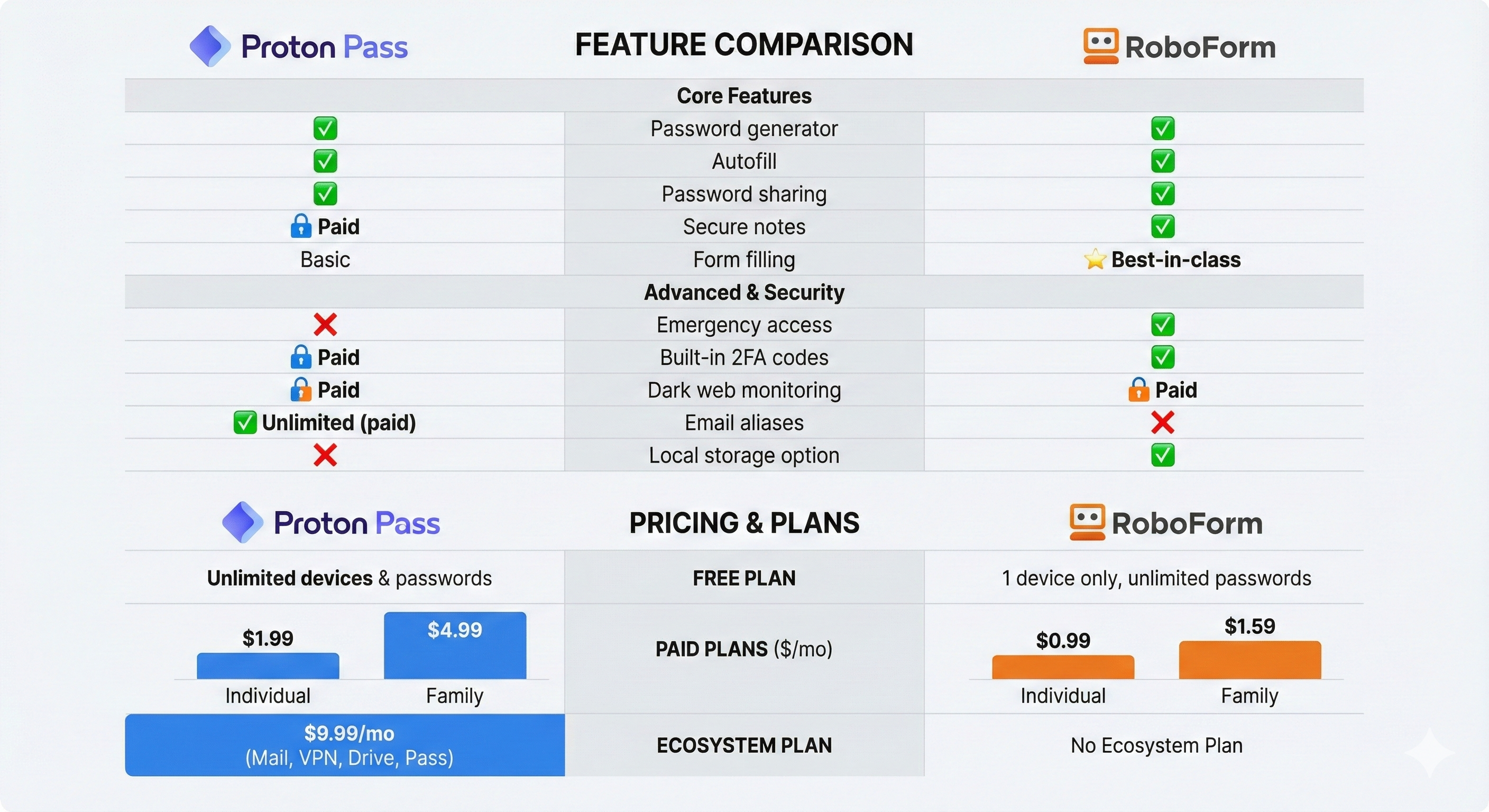
| Feature | Proton Pass | RoboForm |
|---|---|---|
| Password generator | ✓ | ✓ |
| Autofill | ✓ | ✓ |
| Secure notes | ✓ (paid) | ✓ |
| Form filling | Basic | Best-in-class |
| Password sharing | ✓ | ✓ |
| Emergency access | ✗ | ✓ |
| Dark web monitoring | ✓ (paid) | ✓ (paid) |
| Built-in 2FA codes | ✓ (paid) | ✓ |
| Email aliases | ✓ (unlimited paid) | ✗ |
| Local storage option | ✗ | ✓ |
Proton Pass unique features:
- Hide-my-email aliases: Generate unique email addresses for every site. When spam hits an alias, you know exactly who sold your data.
- Proton ecosystem integration: Seamless connection with Proton Mail, VPN, Drive, and Calendar.
- Proton Sentinel: AI-powered account monitoring for suspicious activity.
RoboForm unique features:
- Emergency access: Designate trusted contacts who can request access to your vault if something happens to you.
- Local storage option: Keep everything offline, never touching their cloud servers.
- Advanced form-filling: Handles complex forms with multiple addresses and custom fields better than anyone.
Winner for features: RoboForm for breadth and maturity. Proton Pass for privacy-specific features like email aliases.
Ease of Use
Proton Pass has a cleaner, more modern interface designed in 2023. RoboForm is functional but carries some visual baggage from its long history. Recent updates have modernized the look, but Proton still feels fresher.
Both support importing from other password managers via CSV or direct import. Migration is straightforward whether you're coming from 1Password, LastPass, Bitwarden, or a browser's built-in password storage.
Both have desktop apps (Windows, macOS, Linux), mobile apps (iOS, Android), and browser extensions for Chrome, Firefox, Safari, and Edge. RoboForm also offers smartwatch apps and legacy browser support for enterprise environments.
RoboForm offers local-only storage if you don't trust cloud sync. Proton requires cloud sync but encrypts everything end-to-end before it leaves your device.
Winner for ease of use: Proton Pass for simplicity and modern design. RoboForm if you need advanced features or prefer offline storage.
Pricing Comparison
| Plan | Proton Pass | RoboForm |
|---|---|---|
| Free | Unlimited passwords, unlimited devices | Unlimited passwords, 1 device |
| Individual | $1.99/month | $0.99/month |
| Family | $4.99/month (6 users) | $1.59/month (5 users) |
| Ecosystem | $9.99/month (Mail+VPN+Drive+Pass) | N/A |
Best free tier: Proton Pass (unlimited devices vs. one device is a significant advantage).
Best paid value: RoboForm at half the price of Proton Pass Plus.
Best family plan: RoboForm at roughly one-third the cost of Proton Family.
Best ecosystem: Proton Unlimited if you want encrypted email, VPN, and cloud storage bundled together.
Try Proton Pass | Try RoboForm
Who Should Choose Proton Pass
- You're the type who actually reads privacy policies (and gets angry about them)
- You've been burned before and want to verify security claims yourself
- You're already in the Proton world with Mail, VPN, or Drive
- You want to hide your real email from every service you sign up for
- You like clean, modern software that doesn't feel like it was designed in 2005
Get started with Proton Pass →
Who Should Choose RoboForm
- You want something that just works without paying a premium for it
- You fill out a lot of forms and hate retyping your address for the 500th time
- You want your spouse or kids to access your passwords if something happens to you
- You don't trust the cloud and want everything stored locally on your device
- You'd rather call someone when things break than dig through help articles
Proton Pass vs RoboForm: Which Is Better?
Both are excellent password managers. But if you're forcing me to pick one:
For most people in 2025, I recommend Proton Pass.
The free tier is genuinely usable (unlimited devices, unlimited passwords), the open-source code means you can verify their security claims, and the metadata encryption goes beyond what most competitors offer. Swiss privacy laws are a real advantage, not just marketing. And if you ever want to expand into encrypted email or VPN, you're already in the ecosystem.
RoboForm wins on pure value ($0.99/month is hard to beat) and has features Proton lacks, like emergency access. If budget is your primary concern or you need local-only storage, RoboForm is the smarter pick.
But for the average person starting fresh? Proton Pass. The privacy architecture is simply better.
The Bottom Line
The real point: either choice is dramatically better than reusing passwords or keeping them in a spreadsheet. AI tools can crack weak passwords in seconds. A password manager with unique credentials for every site is your best defense against credential stuffing attacks.
Whichever you choose, start with a strong master password. Generate a strong master password or create a memorable passphrase you'll actually remember. Your master password is the key to everything, so make it count.
FAQ
Is Proton Pass more secure than RoboForm?
Both use AES-256 encryption and zero-knowledge architecture. Proton has an edge in transparency: it's open source with publicly available audit reports and benefits from Swiss privacy laws. Neither has been breached.
Which is better for families?
RoboForm offers better value at $1.59/month for 5 users versus Proton's $4.99/month for 6 users. RoboForm also includes emergency access, which Proton currently lacks.
Can I switch from RoboForm to Proton Pass?
Yes. Export your RoboForm data as CSV, then import into Proton Pass through the desktop app, web app, or browser extension. The process takes a few minutes.
Is Proton Pass really free?
Yes. Unlimited passwords, unlimited devices, password generator, and 10 email aliases. Paid features like dark web monitoring and unlimited aliases require Pass Plus.
Does RoboForm work offline?
Yes. RoboForm offers local-only storage where your encrypted vault stays on your device and never touches their cloud servers.