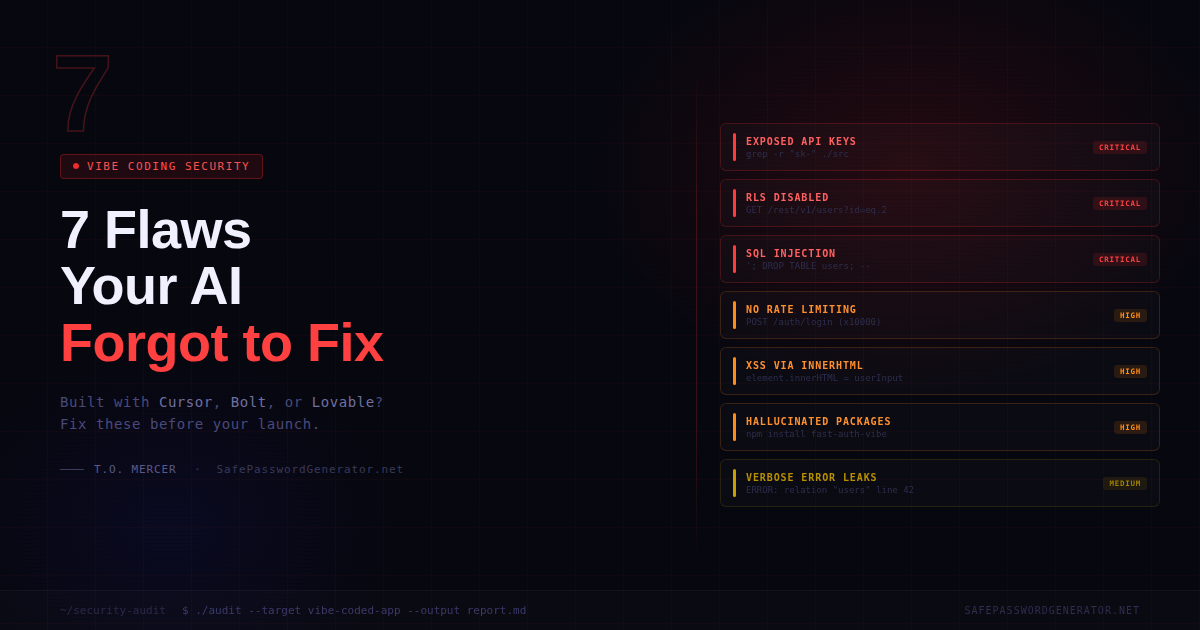
Is vibe-coded software secure? No. AI coding tools like Cursor, Bolt, Lovable, and Replit optimize for functionality, not safety. A 2025 Veracode report found roughly 45% of AI-generated code fails basic security tests. The code works. That does not mean it is ready for real users and real data.
You knocked it out in a weekend. Cursor wrote 90% of it. The app does what you described, it looks decent, and a few friends liked the beta.
Now you are ready to post it on Product Hunt. Here is the reality: an app that "works" and an app that is "safe to launch" are two different things. AI does not know the difference. You have to.
I have spent over a decade doing security work inside companies you would recognize, reviewing codebases ranging from two-person startups to systems handling millions of transactions. The issues I see in vibe-coded apps are not exotic. They are the same ones I was flagging in 2012. The only difference now is how fast they get into production.
- Secrets: Move API keys from frontend code to server-side .env
- Database: Enable Row Level Security (RLS) on all Supabase tables
- Auth: Add rate limiting to /login to prevent brute force scripts
- Input: Use parameterized queries to stop SQL injection
- Dependencies: Run
npm auditto catch AI-hallucinated packages
Why AI Generates Insecure Code (And Does Not Tell You)
Your AI tool was prompted to build something functional. That is what it optimized for. Security requires thinking about what your app should refuse to do, and nobody prompted it to think that way.
A 2025 Veracode report found roughly 45% of AI-generated code fails basic security tests, with vulnerabilities from the OWASP Top 10. The model that built your auth flow has never been breached. It has no instinct for how things go wrong.
The Vibe Coding Security Checklist: 7 Critical Fixes
Critical 1. Your API Keys Are Probably in the Wrong Place
This is the one that ends projects fastest. AI often puts credentials somewhere convenient: in the code itself, in a .env file that got committed, or worse, in JavaScript that ships to the browser.
sk-, Bearer, or API_KEY. Open browser DevTools on your live app, go to Sources, and confirm no sensitive keys are in client-side JS. Your .env file should be in .gitignore and never committed.
Critical 2. Your Supabase Database Is Wide Open
Supabase is the go-to for vibe-coded apps, but AI-generated setup almost never includes Row Level Security (RLS) by default.
Critical 3. Your Login Endpoint Has No Speed Limit
AI-generated auth handles the happy path fine. What it does not handle is someone writing a script that fires 10,000 login attempts at your endpoint in two minutes.
/login, /signup, and /forgot-password routes. Vercel, Supabase, and Railway all have built-in options to block IPs after around 5 failed attempts.
Critical 4. SQL Injection (The 2012 Classic AI Brought Back)
AI builds queries the fast way: string concatenation. User types something, it gets dropped directly into the query.
'; DROP TABLE users; -- into your search bar. This attack is 30 years old and it still works on apps built last week.
' OR '1'='1 and see if the app returns data it should not, or throws a raw database error. Your queries need to use parameterized statements, not assembled strings.
High 5. User Content Is Running as Code (XSS)
Cross-site scripting happens when your app takes user-typed text and renders it as HTML without sanitizing it first. AI uses innerHTML because it is easy. Secure code does not.
innerHTML, dangerouslySetInnerHTML, and eval. Any user-submitted text must go through a sanitizer like DOMPurify before rendering.
High 6. Your Error Messages Are a Roadmap
AI-generated error handling is optimized for debugging, not production. It is verbose because that is useful when you are building. You need to flip that before real users show up.
ERROR: column "user_id" of relation "subscriptions" does not exist at character 42, you have handed an attacker your database schema. They now know exactly where to probe.
High 7. Hallucinated Dependencies
When AI builds your app, it installs packages you never reviewed. Some of those packages do not exist.
npm install, you get malware. One 2025 study put the hallucination rate at roughly 20%.
npm audit or pip audit right now and read what comes back. Go through your package.json and remove anything you do not recognize. Enable GitHub's Dependabot; it is free and flags newly discovered vulnerabilities automatically.
Pre-Launch Infrastructure Check
| Category | Checkpoint | Done |
|---|---|---|
| Secrets | Keys in server-side .env only, not in code or browser | |
| Database | RLS enabled and tested on all tables | |
| Auth | Rate limiting on all auth routes | |
| Sanitization | Parameterized SQL and XSS protection in place | |
| Audit | npm audit cleared, unknown packages removed | |
| Errors | Generic messages to users, details to server logs only | |
| Headers | CSP, X-Frame-Options, X-Content-Type-Options set |
What the Checklist Won't Catch
Running through that list gets you past the obvious stuff. What it cannot catch is your specific business logic.
Can a user on your free plan access paid features by changing a ?plan_id=1 parameter in the URL? Does your Stripe webhook verify the request actually came from Stripe, or will it fire for anyone who calls it? Can someone read another user's private data by swapping an ID in the URL?
These are questions that require someone who has watched apps get broken for a living. Automated scanners find known patterns. Logic flaws require human review.
Need a professional set of eyes before launch?
If you are about to launch something handling real user data or real money, a professional review before launch costs a fraction of what a breach costs after. I do security audits for vibe-coded apps through Six Sense Solutions.
Book a security review →Before You Ship
The app does what you built it to do. That part is done. Now think through what happens when someone shows up specifically trying to break it.
Run the checklist. Fix what you find. If you are staring at something and not sure if it is a problem, that uncertainty is worth resolving before launch, not after. Secure your launch here.
Frequently Asked Questions
Is AI-generated code secure?
No. AI coding tools optimize for functionality, not safety. A 2025 Veracode report found roughly 45% of AI-generated code contains at least one high-severity vulnerability. The code works. That does not mean it is safe to deploy with real users and real data.
How do I secure a Cursor-built app?
Start with the basics: move API keys to server-side environment variables, enable Row Level Security on your database, add rate limiting to your login routes, and run npm audit on your dependencies. Then test your own app as an attacker would before anyone else does.
What is Row Level Security in Supabase?
RLS is a database policy that restricts which rows a user can read or write. Without it, any authenticated user in your app can potentially query any other user's data through the API. It should be enabled on every table that holds user-specific data.
What is a vibe coding security audit?
A security audit for a vibe-coded app is a manual review of your codebase, API routes, and database configuration to identify vulnerabilities that automated tools miss, specifically the logic flaws and architectural gaps that AI tools commonly introduce.
Sources: Do Users Write More Insecure Code with AI Assistants? (Perry et al., arXiv 2022)
T.O. Mercer | SafePasswordGenerator.net