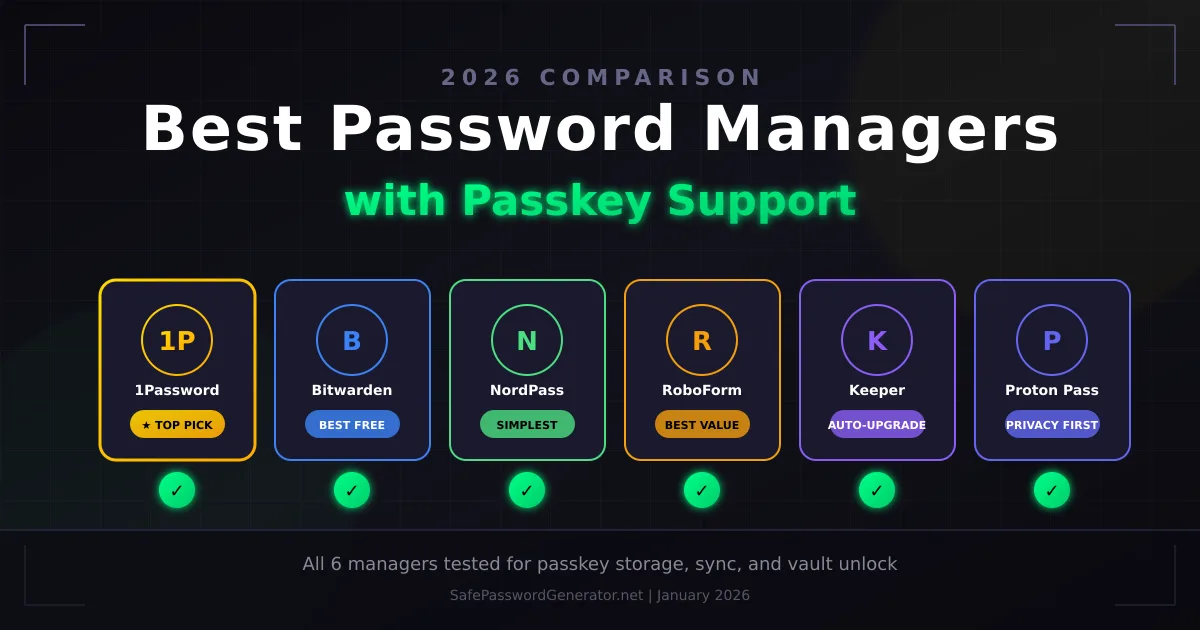
Looking for a password manager that actually supports passkeys? You're not alone. Passkeys are the future of authentication, but not every password manager has caught up. Some have full support across all devices. Others only work on desktop. A few are still figuring it out.
I tested the major password managers to see how well they handle passkeys in 2026. Not just whether they technically support them, but how smoothly they work in practice.
Here's what I found.
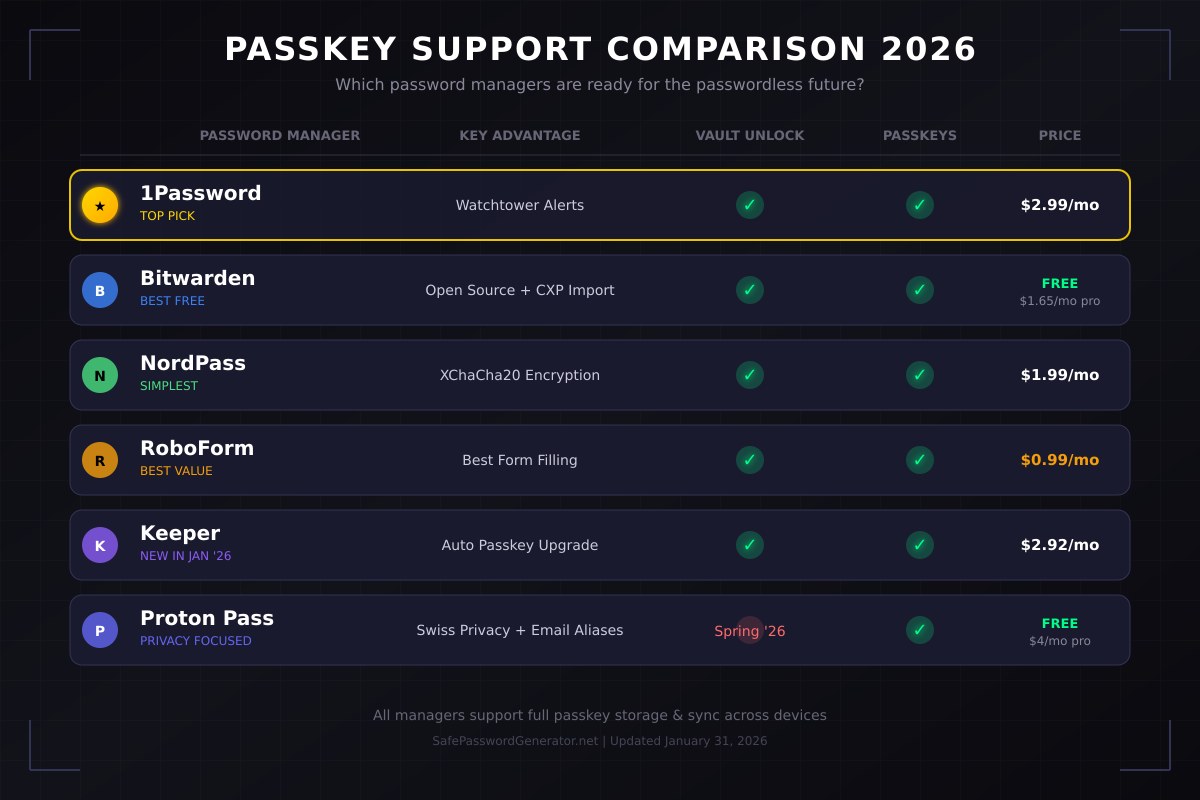
Quick Answer: The best password manager with passkey support in 2026 is 1Password for most users. It offers full passkey support across all platforms (desktop, mobile, browser), alerts you when sites add passkey support via Watchtower, and lets you share passkeys with family members. Bitwarden is the best free option with passkey support on unlimited devices. RoboForm wins for budget users at $0.99/month with solid passkey implementation.
How I Tested
I set up 20 passkeys across an iPhone 15 Pro, a Windows 11 PC, and a MacBook Pro M3 to see how each password manager handled real-world passkey workflows. I tested sync speed between devices, checked for annoying provider selection pop-ups, and deliberately broke things to see how recovery works.
The tests included high-stakes accounts (banking, email) and everyday sites (streaming, social media). I paid particular attention to how each manager handles the AAGUID (the identifier that tells websites which passkey provider you're using). Think of it like a caller ID for your password manager: when you try to sign in with a passkey, Windows asks "Who's calling?" and your password manager answers. 1Password handles this better than others, which eliminates those frustrating "Which passkey provider do you want to use?" pop-ups on Windows that interrupt your login flow.
Quick Comparison: Passkey Support by Password Manager
What to Look for in Passkey Support
Not all passkey implementations are equal. When evaluating password managers, I looked at four things:
1. Cross-platform sync. Can you create a passkey on your laptop and use it on your phone? Some managers only support passkeys on desktop or require you to re-create passkeys on each device.
2. Browser and app support. Does the password manager work in your browser of choice? What about native apps on Windows and macOS? The best implementations work everywhere.
3. Passkey discovery. Does the manager alert you when sites you already use add passkey support? This is where 1Password's Watchtower feature shines.
4. Sharing capabilities. Can you share passkeys with family members? If you share a streaming account, this matters.
The Best Password Managers with Passkey Support
1. 1Password: Best Overall Passkey Experience
Price: $2.99/month (Individual) | $4.99/month (Family, 5 users)
1Password has the most mature passkey implementation I've tested. You can create, store, and use passkeys across all platforms: Windows, Mac, iOS, Android, and every major browser.
What makes it stand out:
Watchtower actively scans your vault and notifies you when sites add passkey support. Most password managers wait for you to discover this yourself. 1Password tells you "Hey, Amazon now supports passkeys. Want to upgrade?"
You can also share passkeys with family members or team members. If you and your partner share a Netflix account, you can share the passkey the same way you'd share a password.
1Password handles the AAGUID (the identifier that tells websites which passkey provider you're using) better than competitors. On Windows, this eliminates those annoying "Which passkey provider do you want to use?" pop-ups that plague other managers.
You can now unlock 1Password itself with a passkey instead of a master password. During my testing, this worked flawlessly across devices.
Downsides: No free tier. The family plan is great value, but solo users pay $36/year for features they might not need.
Who it's NOT for: Users who refuse to pay for a password manager. There's no free option.
Best for: Users who want the smoothest passkey experience and don't mind paying for it.
Read our full 1Password review
2. Bitwarden: Best Free Passkey Support
Price: Free (unlimited devices) | $1.65/month Premium (billed annually at $19.80)
Bitwarden's free tier includes passkey support on unlimited devices. That's remarkable. Most competitors lock passkeys behind paid plans or limit you to one device.
What makes it stand out:
Open source and independently audited. You don't have to trust that they're handling your passkeys correctly. The code is public. Security researchers have verified it.
The free plan includes passkey storage and sync across unlimited devices. You also get breach monitoring, a password generator, and the ability to self-host if you're technical.
As of late January 2026, Bitwarden supports early-access CXP import tools. iPhone users on iOS 26 can now migrate passkeys directly into Bitwarden without recreating them. This is a game-changer for anyone switching password managers.
Downsides: The interface isn't as polished as 1Password. No built-in alerts when sites add passkey support. You'll need to check manually or wait until you visit the site.
Who it's NOT for: Users who want hand-holding. Bitwarden assumes you know what you're doing.
Best for: Budget-conscious users who want real passkey support without paying anything.
Read our full Bitwarden review
3. NordPass: Best for Simplicity
Price: Free (1 device) | $1.99/month Premium | Get NordPass →
Switch to NordPass Before Your Next Renewal
NordPass costs $17.16/year — less than Bitwarden Premium — and includes dark web monitoring Bitwarden still does not offer. Free 30-day trial, no credit card required.
Try NordPass Free for 30 DaysAffiliate link. SPG earns a commission at no extra cost to you.
NordPass comes from the team behind NordVPN, and it shows. The apps are clean, fast, and dead simple to use. Creating and using passkeys takes seconds.
What makes it stand out:
XChaCha20 encryption (instead of the industry-standard AES-256) provides arguably better future-proofing against quantum computing threats. Whether that matters in practice is debatable, but NordPass isn't cutting corners on security.
The passkey creation flow is the smoothest I've tested. You click "Create Passkey," verify with biometrics, and you're done. No confusing options or technical jargon.
NordPass recently added the ability to unlock your vault with a passkey, putting it on par with 1Password and Bitwarden for passwordless access.
Downsides: Free tier limits you to one device. Fewer advanced features than 1Password.
Who it's NOT for: Power users who want granular control. NordPass prioritizes simplicity over customization.
Best for: Non-technical users who want passkey support that "just works."
4. RoboForm: Best Budget Option
Price: $0.99/month promotional | $1.66/month standard (billed annually) | Get RoboForm →
RoboForm has been around for 25 years. That's ancient in tech terms, and it's a feature, not a bug. They've had decades to find and fix security vulnerabilities.
What makes it stand out:
Full passkey support on all platforms at half the price of competitors. Desktop apps, browser extensions, and mobile apps all work with passkeys. You can even unlock RoboForm itself using a passkey.
The autofill is the best I've tested. RoboForm was built for form-filling before password management became popular, and that expertise shows.
Downsides: The interface looks dated compared to 1Password or NordPass. No live chat support on the free tier. The $0.99/month price is promotional; expect to pay $1.66/month after the first year.
Who it's NOT for: Users who care about aesthetics. RoboForm works great but looks like it's from 2015.
Best for: Budget-conscious users who want proven, reliable passkey support at the lowest price.
5. Proton Pass: Best for Privacy
Price: Free (unlimited) | $4/month Premium | Get Proton Pass →
Proton Pass comes from the team behind ProtonMail and ProtonVPN. It's built in Switzerland, which has stronger privacy laws than the US or EU.
What makes it stand out:
Full passkey support combined with hide-my-email aliases. When you create an account on a new site, Proton Pass can generate a unique email address that forwards to your real inbox. When that site gets breached or starts spamming you, delete the alias. Your real email stays private.
The free tier is genuinely useful: unlimited passwords, unlimited passkeys, and sync across devices.
Downsides: Newer product with a smaller ecosystem. No passkey-based unlock for Proton Pass itself yet, though it's confirmed for their Spring 2026 roadmap. Proton's current development focus is on their Drive SDK and CLI tools for power users.
Who it's NOT for: Users who need enterprise features or team management. Proton Pass is built for individuals. If you need vault unlock with passkeys today, choose 1Password or Bitwarden instead.
Best for: Privacy-focused users who want passkey support without compromising on data protection.
Read our full Proton Pass review
6. Dashlane: Most Features (If You'll Use Them)
Price: $4.99/month Premium
Dashlane bundles a VPN, dark web monitoring, and phishing protection with its password manager. It supports passkeys across all platforms.
What makes it stand out:
The all-in-one approach means fewer subscriptions to manage. If you'd pay for a VPN anyway, Dashlane's bundle pricing makes sense.
Passkey support works well in practice. Creating and using passkeys is straightforward across all platforms. Dashlane partnered with Yubico in late 2025 to enable full passwordless login using FIDO2 security keys and passkeys, so you can now unlock your vault without a master password.
Downsides: Expensive if you only want password and passkey management. No free tier beyond a limited trial. Based in the US (Five Eyes jurisdiction).
Who it's NOT for: Budget-conscious users. You're paying premium prices for features you might not use.
Best for: Users who want an all-in-one security suite, not just a password manager.
7. Keeper: The January 2026 Comeback
Price: $2.92/month (Personal) | Add-ons available
Keeper made major moves in January 2026 that changed my assessment. They announced Conditional Passkey Creation on January 22, which automatically detects when sites support passkeys and upgrades your login in the background.
What makes it stand out:
The new Conditional Passkey Creation feature is genuinely innovative. When you visit a site that now supports passkeys, Keeper silently creates one and notifies you when it's done. No manual work required. This is the closest thing to "set it and forget it" passkey migration I've tested.
Keeper also rolled out Passwordless Vault Unlock for mobile and browser extensions this month, closing the gap with 1Password and Bitwarden.
The zero-trust architecture treats every device as potentially compromised. Your data is encrypted on your device before it ever touches Keeper's servers.
Downsides: Some premium features (dark web monitoring, secure file storage) still cost extra. The January updates are new, so long-term stability remains to be seen.
Who it's NOT for: Users who hate upsells. Keeper's add-on pricing can feel nickel-and-dime, though the base product is now much stronger.
Best for: Users who want automated passkey migration without lifting a finger.
Password Managers with Limited Passkey Support
LastPass: Supports storing passkeys, but the browser-only implementation feels incomplete. Given their breach history (2022), I can't recommend them for passkey storage. Read why we recommend avoiding LastPass
Apple Passwords / iCloud Keychain: Supports passkeys natively on Apple devices, but there's no Windows or Android support. Only works within the Apple ecosystem.
Google Password Manager: Supports passkeys on Chrome and Android, but limited on other platforms. Ties your passkeys to your Google account.
How Passkeys Work in Password Managers
When you create a passkey for a website, your password manager generates two cryptographic keys:
Public key: Sent to the website. They store it on their servers.
Private key: Stays in your password manager's vault. Never leaves your devices.
When you sign in, the website sends a challenge. Your password manager uses the private key to sign it. The website verifies the signature using your public key. If it matches, you're in.
This is why passkeys are phishing-resistant. Even if you visit a fake website, they can't steal your passkey because they never have access to the private key.
For a deeper dive into how passkeys work, read our complete guide to passwordless authentication.
Why You Still Need a Password Manager for Passkeys
"If passkeys replace passwords, why do I need a password manager?"
Three reasons:
1. Most sites don't support passkeys yet. As of early 2026, only a few hundred major sites support passkeys. You have 100+ accounts. The math doesn't work. You'll need passwords for years to come.
2. Passkeys need to sync across devices. Apple, Google, and Microsoft each want your passkeys locked in their ecosystem. A dedicated password manager works across all platforms. Switch from iPhone to Android? Your passkeys come with you.
3. Passkeys have a recovery problem. Lose your phone without backup? Your passkeys are gone. Password managers sync across multiple devices and offer recovery options.
Which Password Manager Should You Choose?
Choose 1Password if: You want the best passkey experience and don't mind paying $3/month. The Watchtower feature that alerts you when sites add passkey support is worth the price alone.
Choose Bitwarden if: You want real passkey support without paying anything. The free tier is genuinely useful.
Choose NordPass if: You want simplicity. The apps are clean and passkey creation is effortless.
Choose RoboForm if: Budget is your priority. $0.99/month gets you full passkey support.
Choose Keeper if: You want automated passkey migration. The new Conditional Passkey Creation feature (January 2026) handles upgrades in the background.
Choose Proton Pass if: Privacy matters more than features. Swiss jurisdiction and hide-my-email aliases protect your data.
Get Started Today
Ready to upgrade to passkeys? Here's the fastest path:
- Pick a password manager from this list
- Import your existing passwords
- Check which of your accounts support passkeys (1Password's Watchtower does this automatically)
- Create passkeys for your most important accounts: email, banking, social media
- Enable passkeys for new accounts going forward
The transition won't happen overnight. But every passkey you create is one less password that can be phished, leaked, or cracked.
Need help creating strong passwords for accounts that don't support passkeys yet? Use our free password generator.
Frequently Asked Questions
Which password manager has the best passkey support in 2026?
1Password has the most complete passkey implementation: full support across all platforms, Watchtower alerts for passkey-ready sites, and the ability to share passkeys with family members. Bitwarden is the best free option with passkey support on unlimited devices.
Can I use passkeys with a free password manager?
Yes. Bitwarden's free tier includes passkey support on unlimited devices. Proton Pass also offers passkey support in its free plan. NordPass free works but limits you to one device.
Do all password managers support passkeys?
Most major password managers now support passkeys, but implementation quality varies. 1Password, Bitwarden, NordPass, RoboForm, Keeper, and Dashlane have full support. LastPass has limited implementation.
Should I switch from passwords to passkeys?
Gradually, yes. Create passkeys for accounts that support them, especially high-value accounts like email and banking. Keep your password manager for the hundreds of sites that still require passwords.
What happens to my passkeys if I switch password managers?
The good news: passkey lock-in is ending. As of late January 2026, Apple (iOS 26) and Bitwarden have released early-access import/export tools using the FIDO Alliance's Credential Exchange Protocol (CXP). iPhone users can now move passkeys directly into Bitwarden without recreating them manually.
Dashlane and 1Password are also testing CXP tools. The standard is currently in "Proposed Standard" status, with full industry adoption expected by late 2026 or early 2027. If you're switching password managers today, check if your current and target managers support CXP import/export.
For more on how passkeys work and whether they're right for you, read our complete guide: Passwordless Authentication in 2026: What It Actually Means for You
T.O. Mercer | SafePasswordGenerator.net