The "Space Lobster" Trap
OpenClaw exploded from 9,000 to 100,000+ GitHub stars in less than a week. The "space lobster" AI agent-named after creator Peter Steinberger's personal assistant Molty-promised to be your always-on digital assistant. Book flights. Manage email. Run commands on your machine through WhatsApp or iMessage. It was the closest thing to a personal JARVIS the open-source world had ever seen.
If you haven't removed OpenClaw yet, start with the uninstall guide, then come back here to pick a replacement.
Then the security reports started rolling in.
"Personal AI Agents like OpenClaw Are a Security Nightmare... OpenClaw fails decisively. The skill we invoked is functionally malware."
Cisco's researchers found that 26% of the 31,000 agent skills they analyzed contained at least one vulnerability. They ran a skill called "What Would Elon Do?" against OpenClaw and surfaced nine security issues-two critical, five high-severity. The skill used prompt injection to bypass OpenClaw's system instructions, then actively exfiltrated data to an external server via curl commands. It wasn't a bug-it was an open door. And it was the #1 ranked skill in the repository.
If you've read our OpenClaw security risks breakdown and decided it's not worth the risk, you're not alone. But you still want AI automation. You still want that "JARVIS" experience.
Here are the best alternatives-ranging from enterprise-grade managed platforms to open-source tools you can actually trust.
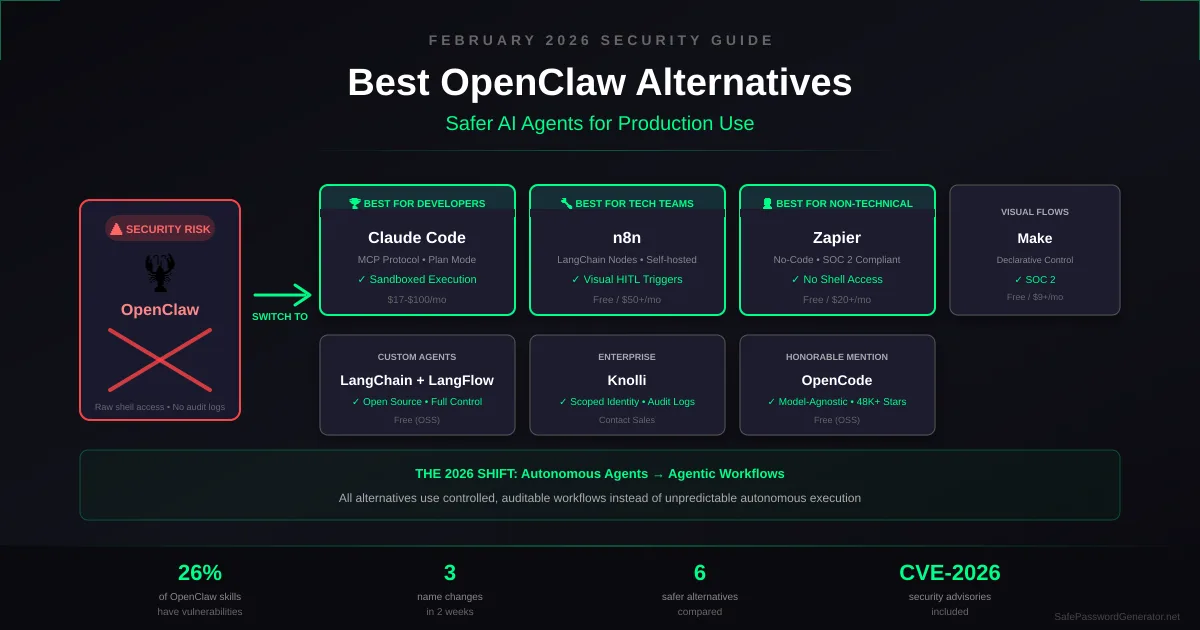
Quick Comparison: OpenClaw Alternatives
| Tool | Best For | Security Model | Key "Safe" Feature | Price |
|---|---|---|---|---|
| Claude Code | Developers | Managed sandbox | MCP-based local context | $17-100/mo |
| n8n | Technical teams | Self-hosted / Air-gapped | Visual HITL triggers | Free / $50+/mo |
| Zapier | Non-technical users | Cloud, SOC 2 | No shell/terminal access | Free / $20+/mo |
| Make | Visual workflows | Cloud, SOC 2 | Declarative flow control | Free / $9+/mo |
| LangChain + LangFlow | Custom agents | You control it | Modular, auditable chains | Free (OSS) |
| Knolli | Enterprise | RBAC & Audit Trails | Scoped identity permissions | Contact sales |
Why People Are Leaving OpenClaw
Before we dive into alternatives, let's be clear about the problems you're solving:
1. Security is opt-in, not default. OpenClaw grants raw shell access by default. One malicious skill is all it takes to compromise your root directory. The documentation admits: "There is no 'perfectly secure' setup."
2. Supply chain risks are real. The skill marketplace is unvetted. Malicious forks often impersonate official modules. The Cisco report found that actors with malicious intentions can manufacture popularity on top of existing hype cycles.
3. No audit trails. Enterprise compliance requires logging. OpenClaw flies blind. When something goes wrong, you're reconstructing events from memory.
4. Chaos as a feature. Three name changes in two weeks (Clawdbot → Moltbot → OpenClaw) signals a project that is too unstable for production. The crypto scams that emerged during the rebrand chaos didn't help.
5. You're responsible for everything. Self-hosting means every vulnerability is your problem. Most people don't have the time or expertise to harden an AI agent runtime that's evolving faster than you can patch it.
The Best OpenClaw Alternatives
1. Claude Code - Best for Developers Who Want AI That Just Works
What it is: Anthropic's official terminal-based coding assistant. It runs Claude models directly in your terminal with agentic capabilities-but within guardrails that OpenClaw lacks.
Why it's safer than OpenClaw:
- MCP (Model Context Protocol) for local context: Here's the key difference. Claude Code uses MCP to pull in local file context, codebase structure, and project knowledge without granting the model raw root access. OpenClaw gives the AI shell access. Claude Code gives it contextual awareness through a controlled, read-only protocol.
- Plan Mode for transparency: Before executing multi-step tasks, Claude Code builds a
plan.mdand asks for confirmation. OpenClaw's autonomous nature means it acts first-sometimes catastrophically. - OS-level sandboxing: Claude Code uses Linux
bubblewrapand macOSseatbeltto enforce filesystem and network isolation. Even if the AI "wanted" to access/etc/passwd, the sandbox blocks it. - No third-party skills problem: There's no marketplace of unvetted plugins. The attack surface is dramatically smaller.
- 80.9% SWE-bench accuracy: Claude Opus 4.5 is the first model to crack 80% on this benchmark, meaning it actually works for complex coding tasks-not just demos.
The tradeoff: Claude Code is for coding, not general life automation. It won't book your flights or manage your calendar. It's laser-focused on software development.
Pricing:
- Claude Pro: $17/month (with usage limits)
- Claude Max: $100/month (heavy users)
Best for: Developers who want AI coding assistance without the security anxiety. If you were using OpenClaw primarily for code tasks, this is your direct replacement.
Learn more about Claude Code →
💡 Honorable Mention: OpenCode - If you want Claude Code's terminal-based workflow but need model flexibility, check out OpenCode. It's the open-source, model-agnostic alternative (supports Claude, GPT-4, Gemini, and local LLMs). Same philosophy-agentic coding without raw shell access-but you bring your own API keys. 48K GitHub stars and growing.
2. n8n - Best for Technical Teams Who Want Full Control
What it is: An open-source workflow automation platform with native AI capabilities. Think "Zapier but self-hosted with code access and AI agent nodes."
Why it's safer than OpenClaw:
- Explicit, declarative workflows: Instead of an autonomous agent making decisions, you define exactly what happens step-by-step in a visual flow. No surprises.
- LangChain integration via AI Nodes: This is what most teams are actually using in 2026. n8n's AI Nodes let you build agent-like behavior-summarization, classification, content generation-but constrained within a defined workflow sandbox. The AI can't decide to "just run a shell command." It can only do what the workflow allows.
- Human-in-the-loop (HITL) by design: Add approval steps before AI actions take effect. Manager signs off on the bank transfer before it executes. Your compliance team will thank you.
- Role-based access control: Define who can modify which workflows. Audit everything.
- Self-hosted or air-gapped: Run it on your own servers. Your data never leaves your infrastructure if you don't want it to.
- 400+ integrations: Connect to the tools you actually use-Slack, Google, Salesforce, OpenAI, Claude, local LLMs via Ollama.
The tradeoff: n8n is not an autonomous agent. It's a workflow builder with AI capabilities. You're trading "AI that decides what to do" for "AI that does exactly what you told it to do." For most business use cases, that's a feature, not a bug.
⚠️ Security Note: While n8n is architecturally safer than OpenClaw, ensure you're running version 1.121.0+ to patch CVE-2026-21858 (unauthenticated RCE) that affected self-hosted instances in early January. Self-hosted users should check the n8n security advisories regularly.
Pricing:
- Self-hosted: Free (no feature limitations)
- Cloud Starter: ~$50/month (10K workflow executions)
- Cloud Pro: ~$120/month (includes Advanced AI Execution limits-important if you're running heavy LangChain workflows)
- Enterprise: Custom
Best for: Technical teams who want AI automation without giving up control. If you liked OpenClaw's automation potential but hated the security model, n8n is your answer.
3. Zapier - Best for Non-Technical Users
What it is: The original workflow automation platform. Connect apps, trigger actions, no code required.
Why it's safer than OpenClaw:
- No shell access: Zapier connects APIs. It doesn't run arbitrary code on your machine.
- SOC 2 compliant: Enterprise-grade security and audit trails built in.
- Predictable behavior: Zaps do exactly what you configure. They don't "decide" to do something unexpected.
- New AI features: Zapier now includes AI steps (summarize text, generate content) without the risks of autonomous agents.
The tradeoff: Zapier is expensive at scale. Heavy users can easily hit $500+/month. And you're trusting a third party with your data.
Pricing:
- Free: 100 tasks/month
- Starter: $20/month
- Professional: $50/month
- Teams/Enterprise: $100+/month
Best for: Non-technical users who want automation without any setup complexity.
4. Make (formerly Integromat) - Best for Visual Workflow Builders
What it is: A visual automation platform with more granular control than Zapier at lower prices.
Why it's safer than OpenClaw:
- Visual flow builder: See exactly how data moves through your automation. No black boxes.
- Granular error handling: Define fallback paths when something fails.
- SOC 2 compliant: Enterprise security standards.
- More affordable: 10,000 operations for ~$9/month vs. Zapier's 750 tasks for $20/month.
The tradeoff: Steeper learning curve than Zapier. More powerful, but requires more time to master.
Pricing:
- Free: 1,000 ops/month
- Core: $9/month (10,000 ops)
- Pro: $16/month (10,000 ops + priority)
Best for: Users who want more control than Zapier at lower cost.
5. LangChain + LangFlow - Best for Building Custom AI Agents
What it is: LangChain is a framework for building AI applications. LangFlow adds a visual builder on top.
Why it's safer than OpenClaw:
- You control the architecture: Build exactly what you need, nothing more.
- No mystery skills: Every component is something you chose to include.
- Open source: Audit the code yourself.
- Runs anywhere: Local, cloud, air-gapped-your choice.
The tradeoff: This is a developer tool, not a turnkey solution. You need to know what you're building. There's no "just install and go."
Pricing: Free (open source). You pay for compute and API calls.
Best for: Developers who want to build custom AI agents from scratch.
6. Knolli - Best for Enterprise with Compliance Requirements
What it is: The antithesis of OpenClaw. Instead of one autonomous agent that can do anything, Knolli gives you a Managed Copilot Fleet-specialized AI assistants with cryptographically enforced boundaries.
Why it's safer than OpenClaw:
- Scoped "Identity" permissions: Your "Finance Copilot" has permission to read invoices but is cryptographically blocked from your
~/.sshfolder. The "HR Copilot" can access employee records but can't touch financial systems. This isn't just RBAC-it's identity-scoped capability enforcement. - Human-in-the-Loop (HITL) triggers: This is why enterprises are choosing Knolli over OpenClaw. You can configure "Manager Approval" gates for sensitive actions-bank transfers, contract signatures, customer data access. OpenClaw's autonomous nature has no concept of "wait for sign-off."
- Full audit logging: Every action, every decision, every piece of context the AI used-logged and exportable for SOC 2, HIPAA, and financial compliance review.
- Role-based access control (RBAC): Define who can create copilots, who can modify them, and who can approve their actions.
- No skill marketplace risk: Capabilities are curated, vetted, and controlled by your organization.
The tradeoff: Enterprise pricing and sales process. Not for individual developers or small teams. If you're not dealing with SOC 2, HIPAA, or financial compliance requirements, Knolli is overkill.
Best for: Large organizations with compliance requirements who can't risk autonomous AI making unsupervised decisions. Banks, healthcare systems, and regulated industries.
What About Just Using ChatGPT or Claude Directly?
Honestly? For most people, this is the right answer.
If you want AI help with tasks, just use the chat interface:
- ChatGPT Plus ($20/mo) or Claude Pro ($20/mo) handle most knowledge work
- No security risks from agent execution
- No infrastructure to maintain
- Works on mobile and desktop
The "agent" hype is real, but the technology isn't mature enough for most users. Chatbots that "say things" are safer than agents that "do things"-at least until the security story improves.
How to Choose the Right Alternative
Choose Claude Code if:
- You're a developer
- You want AI coding help
- You trust Anthropic's security model
Choose n8n if:
- You're technical but not a full-time developer
- You want self-hosted automation with AI capabilities
- You need audit trails and compliance features
Choose Zapier or Make if:
- You're not technical
- You want simple app-to-app automation
- You're okay paying for convenience
Choose LangChain if:
- You're building custom AI applications
- You need full control over the architecture
- You have development resources
Choose to wait if:
- You wanted OpenClaw for personal assistant features
- You don't have critical automation needs
- You can wait for the security ecosystem to mature
The Bottom Line: Autonomy vs. Agency
OpenClaw showed us what's possible: a 24/7 AI assistant that actually takes action, manages your inbox, and books your reservations. The vision is compelling.
But here's what the OpenClaw hype obscured: there's a fundamental difference between Autonomous Agents and Agentic Workflows.
| Autonomous Agents (OpenClaw) | Agentic Workflows (Alternatives) |
|---|---|
| AI decides what, when, how | Humans define the rails |
| Unpredictable by design | Predictable by design |
| Great for demos | Safe for production |
| "Figure it out" | "Do exactly this" |
The 2026 shift isn't from "dumb automation" to "smart agents." It's from unpredictable autonomy to controlled agency. The tools in this guide represent that shift:
- Claude Code gives you agentic coding within Anthropic's sandbox + OS-level isolation
- n8n gives you AI-powered workflows with visual HITL controls
- Zapier/Make give you triggered automation with AI enhancement
- Knolli gives you a managed copilot fleet with cryptographic boundaries
The "personal AI assistant that does everything" is still science fiction. What's real in February 2026 is AI that does specific things well within defined boundaries. That's not a limitation-it's the architecture that makes AI actually usable in production.
Until the security story improves, these alternatives let you get real work done without betting your infrastructure on an unaudited GitHub repo with 100,000 stars and three name changes in two weeks.
Switch to NordPass Before Your Next Renewal
NordPass costs $17.16/year — less than Bitwarden Premium — and includes dark web monitoring Bitwarden still does not offer. Free 30-day trial, no credit card required.
Try NordPass Free for 30 DaysAffiliate link. SPG earns a commission at no extra cost to you.
Migration Guide: Moving from OpenClaw
If you've been running OpenClaw and want to migrate to a safer alternative, here's how to transition your existing workflows.
Migrating to Claude Code (for Developers)
| What Transfers | What Changes |
|---|---|
| Git workflows, file operations | Skills → MCP Servers |
| Code-related automations | Autonomous → Plan Mode confirmation |
Steps:
- Export your OpenClaw skills:
~/.openclaw/skills/ - Rewrite as CLAUDE.md: Convert skill instructions to markdown context files in your project root
- Set up MCP servers for external integrations (databases, APIs)
- Test in Plan Mode first - Claude Code will build a
plan.mdand ask before executing
Example conversion:
# OpenClaw skill (risky - raw shell access)
name: "deploy-to-staging"
commands:
  - "git push origin staging"
  - "ssh deploy@server 'cd /app && ./deploy.sh'"

# Claude Code equivalent (safer - contextual instructions)
# In your project's CLAUDE.md:
## Deployment
- Staging deployments go to `origin/staging`
- Never deploy directly to production
- Always run tests before pushing
- Use the deploy MCP server for remote execution
Migrating to n8n (for Automation Workflows)
| What Transfers | What Changes |
|---|---|
| API keys, integration logic | Autonomous decisions → Conditional switches |
| Scheduled tasks, notifications | "Figure it out" → Explicit triggers |
Steps:
- Map skills to workflows: Each OpenClaw skill becomes an n8n workflow with explicit triggers
- Replace autonomy with switches: Use the Switch node for conditional logic
- Add AI Nodes for intelligence: LangChain nodes handle summarization, classification, content generation
- Insert HITL approval nodes: Require manual approval for sensitive actions
Example conversion:
# OpenClaw skill (autonomous)
"Monitor my inbox and reply to scheduling requests"

# n8n workflow (controlled)
Trigger: Gmail (New Email)
  ↓
Filter Node (Subject contains "meeting" or "schedule")
  ↓
AI Node (LangChain: Classify intent)
  ↓
Switch Node → Meeting request → Check Calendar → Draft reply
           → Reschedule → Draft options
  ↓
HITL: Approval (Slack/Email) ← Human reviews draft before sending
  ↓
Gmail: Send
Interactive: OpenClaw → n8n Migration Demo
What You'll Lose (and Why That's Okay)
Autonomous messaging: OpenClaw could message you proactively via WhatsApp/iMessage. The alternatives don't-and that's by design. Proactive AI messaging is a security and UX nightmare waiting to happen.
"Figure it out" capabilities: OpenClaw would attempt tasks even without explicit instructions. The alternatives require you to define what you want. This feels limiting but prevents the "AI decided to delete my files" scenarios.
Single unified agent: You'll likely use multiple tools now (Claude Code for dev, n8n for automation). This fragmentation is annoying but reflects the reality that no single tool safely handles everything yet.
Frequently Asked Questions
Is OpenClaw safe to use?
OpenClaw itself isn't inherently malicious, but its architecture creates significant security risks. It requires shell access to your machine, relies on community-contributed skills (26% of which contain vulnerabilities according to Cisco), and doesn't provide audit trails by default. For most users, the risk outweighs the benefits. See our complete OpenClaw security analysis.
What's the most secure OpenClaw alternative?
For developers, Claude Code offers the best security-to-capability ratio because Anthropic manages the infrastructure and there's no third-party skill marketplace. For teams needing automation, n8n self-hosted gives you full control over your data and execution environment.
Can I get OpenClaw-like features without the security risks?
Not yet-at least not in a single tool. The autonomous agent capabilities that make OpenClaw exciting are also what make it risky. Current alternatives like n8n and Zapier offer workflow automation (you define the steps), not autonomous agents (AI decides the steps). For most business use cases, that's actually better.
Is n8n really free?
The self-hosted version of n8n is genuinely free with no feature limitations. You're responsible for your own server and maintenance. The cloud version starts around $50/month and includes managed hosting, automatic updates, and support.
Should I wait for OpenClaw to improve its security?
That depends on your risk tolerance. The OpenClaw team is actively working on security improvements, and the January 30, 2026 release included several patches. However, the fundamental architecture-autonomous agents with shell access running community-contributed skills-creates inherent risks that can't be fully patched away. If you need automation now, the alternatives in this guide are more production-ready.
Want to stay secure while using AI tools? Read our guides on passwordless authentication and password manager security.
For a deeper look at how modern authentication has evolved beyond passwords entirely, see our 2026 passwordless authentication guide covering FIDO2 passkeys, token binding, and continuous access evaluation.
Related Articles:
- OpenClaw Security Risks: Is It Safe? (2026 Analysis)
- How to Uninstall OpenClaw Completely
- Best Password Managers with Passkey Support (2026)
T.O. Mercer | SafePasswordGenerator.net